


What would you like ready for you when Azure Monitor pages you at 2:47 a.m. a few net app you didn’t construct? The matching runbook definition’s queries have run and a drafted repair is ready to your approval by the point you open the web page.
You construct that as an Azure Automation runbook. An Azure Monitor alert begins an Automation job, the job picks a runbook definition (a JSON doc that lists the diagnostics to run and the one repair to suggest) from the alert itself, and a mannequin chooses among the many read-only queries you wrote and drafts the remediation. The on-call engineer receives the proposal and the launch command for the repair.
Conditions
To construct this your self, you want:
How the Azure Monitor Alert-to-Runbook Circulation Works
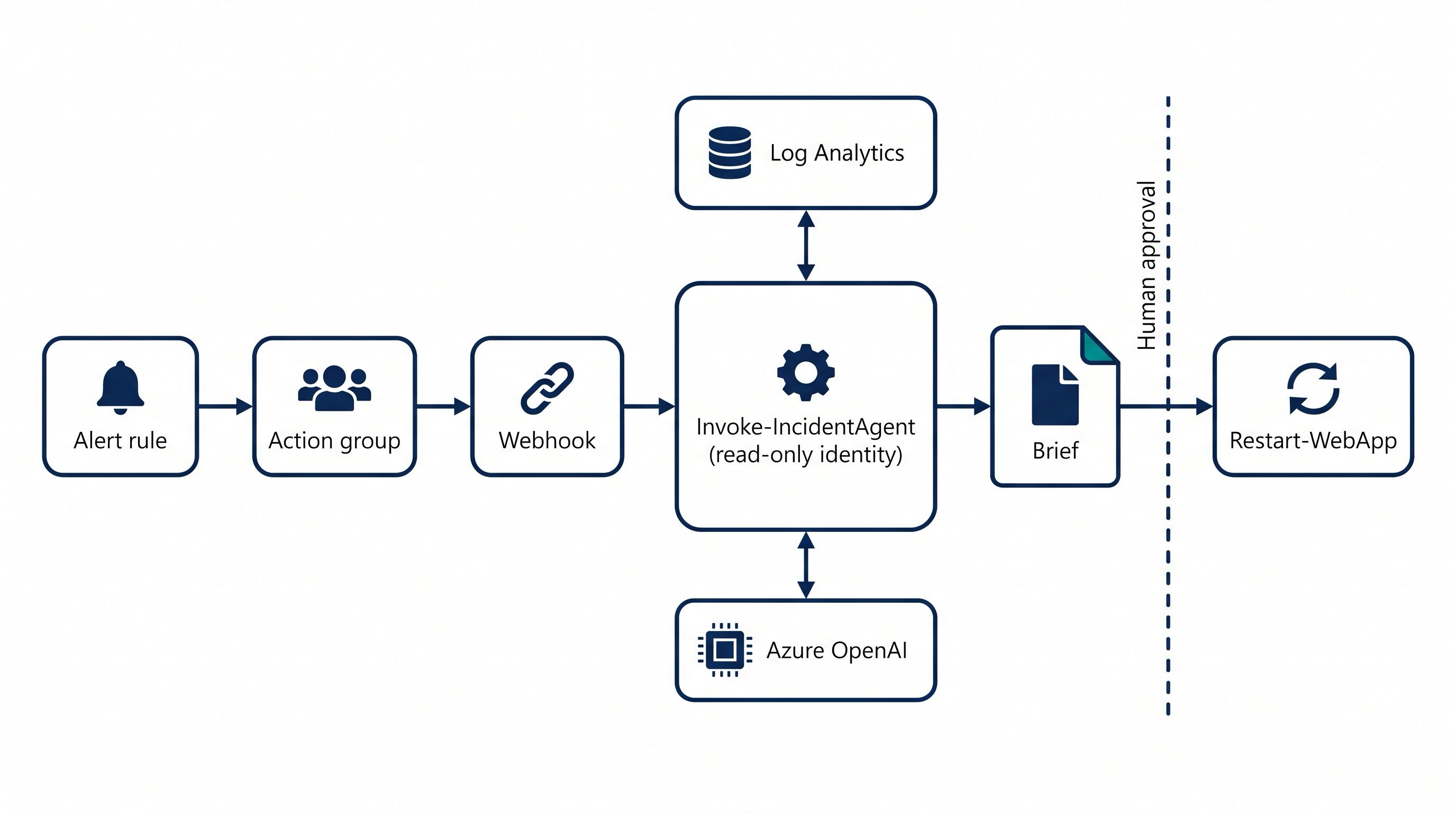
Two issues listed below are known as runbooks. A runbook definition is the JSON you write: steps, diagnostic queries, and one repair. An Automation runbook is an Azure Automation script. The agent is one Automation runbook, Invoke-IncidentAgent, whose mannequin loop picks which of your queries to run subsequent. Microsoft paperwork each bit under besides the runbook customized property, a conference you set on the alert rule.
-
An alert rule fires and calls an motion group.
-
The motion group posts the alert to the script’s webhook.
-
The script masses the runbook definition the alert names.
-
The mannequin calls read-only diagnostics and drafts a proposal.
-
The engineer will get the proposal and a launch command.
The webhook sits within the center as a result of Microsoft Study lists its response as 202 Accepted: “The request was accepted, and the runbook was efficiently queued.” The motion teams reference says: “After retries tried to name the webhook fail, no motion group calls the endpoint for quarter-hour.” The docs give no caller timeout. The investigation runs within the queued job after the webhook solutions.
The diagram reveals the trail and the place a human takes over.
Step 1: Learn the Alert and Decide a Runbook Definition
The webhook physique carries the alert’s necessities block and the customProperties you set on the alert rule.
Learn the Alert Payload
The widespread alert schema offers each alert sort one JSON form. The web page says you “can use the fields within the Necessities part to supply routing logic for all alert sorts.” The agent reads 5.
| Discipline | What the agent does with it |
|---|---|
monitorCondition |
Fired begins an investigation. Resolved ends the job. |
alertTargetIDs |
The primary entry is the useful resource to diagnose. |
severity |
Sev0 to Sev4, copied into the transient for triage. |
originAlertId |
The alert occasion’s ID from the monitoring service, usable as a de-duplication key. |
customProperties |
Key:worth pairs set on the alert rule. The agent makes use of a runbook key to call the definition. |
Automation begins the runbook on each state change. Microsoft’s alert-triggered runbook tutorial tells you to “test the alert standing within the runbook that’s triggered.” Skipping Resolved retains one incident from producing two briefs. The agent assumes a metric alert, the place alertTargetIDs is the useful resource. For a log search alert on a workspace, the schema web page says the goal is the workspace. Learn the affected useful resource from configurationItems or a dimension.
Write the Runbook Definition
Preserve each definition in a single file, definitions.json, keyed by the worth you set within the alert’s runbook property.
{
  "app-service-5xx": {
    "steps": [
      "Call run_diagnostic with recent_changes to see what changed on the resource.",
      "Call run_diagnostic with metric_summary to see which metrics peaked."
    ],
    "stopConditions": [
      "If a deployment finished in the two hours before the alert, set action to null and name the deployment as the probable cause."
    ],
    "diagnostics": [
      {
        "name": "recent_changes",
        "kql": "AzureActivity | where _ResourceId =~ '{resourceId}' | where CategoryValue == 'Administrative' | project TimeGenerated, OperationNameValue, ActivityStatusValue, Caller | order by TimeGenerated desc"
      },
      {
        "name": "metric_summary",
        "kql": "AzureMetrics | where _ResourceId =~ '{resourceId}' | summarize Peak = max(Maximum), Average = avg(Average) by MetricName | order by Peak desc | take 10"
      }
    ],
    "remediation": {
      "runbook": "Restart-WebApp",
      "automationAccount": "<automation-account>",
      "resourceGroup": "<resource-group>",
      "allowedParameters": ["AppName"]
    }
  }
}-
stepsandstopConditionsgrow to be the mannequin’s directions. The instance cease situation withholds the restart when a deployment completed within the two hours earlier than the alert, as a result of a rollback is the likelier repair. -
diagnosticsholds named Kusto Question Language (KQL) queries, the language Log Analytics makes use of. The script replaces{resourceId}earlier than every question runs. -
remediationnames the one Automation runbook this definition might suggest and the one parameters it might carry.
The primary block of Invoke-IncidentAgent masses the alert and the definition. Later steps add blocks to the identical script.
param([object] $WebhookData)
$ErrorActionPreference = 'Cease'

$alert = ($WebhookData.RequestBody | ConvertFrom-Json).information
$necessities = $alert.necessities
if ($necessities.monitorCondition -ne 'Fired') {
    Write-Output "Ignoring a $($necessities.monitorCondition) notification."
    return
}

$resourceId = $necessities.alertTargetIDs[0]
if ($resourceId -notmatch '^/subscriptions/[0-9a-f-]{36}/resourceGroups/[w.()-]+/suppliers/[w./-]+$') {
    throw "Sudden useful resource ID: $resourceId"
}

$key = $alert.customProperties.runbook
if (-not $key) { throw 'The alert has no runbook customized property.' }
$definition = (Get-AutomationVariable -Title 'RunbookDefinitions' | ConvertFrom-Json).$key
if (-not $definition) { throw "No runbook definition named '$key'." }
Automation passes the POST physique in by means of WebhookData.RequestBody, because the webhook documentation describes. The useful resource ID test issues as a result of that ID will get pasted into a question. Contained in the job, Get-AutomationVariable reads Automation variables as an alternative of native recordsdata. Step 4 creates RunbookDefinitions from definitions.json.
Step 2: Give the Agent Learn-Solely Diagnostics
No matter question the mannequin picks, Log Analytics runs it below the Automation account’s managed identification.
Assign the Learn-Solely Position
| Actor | Identification | Position | Scope |
|---|---|---|---|
Invoke-IncidentAgent |
Automation account identification | Log Analytics Reader | One workspace |
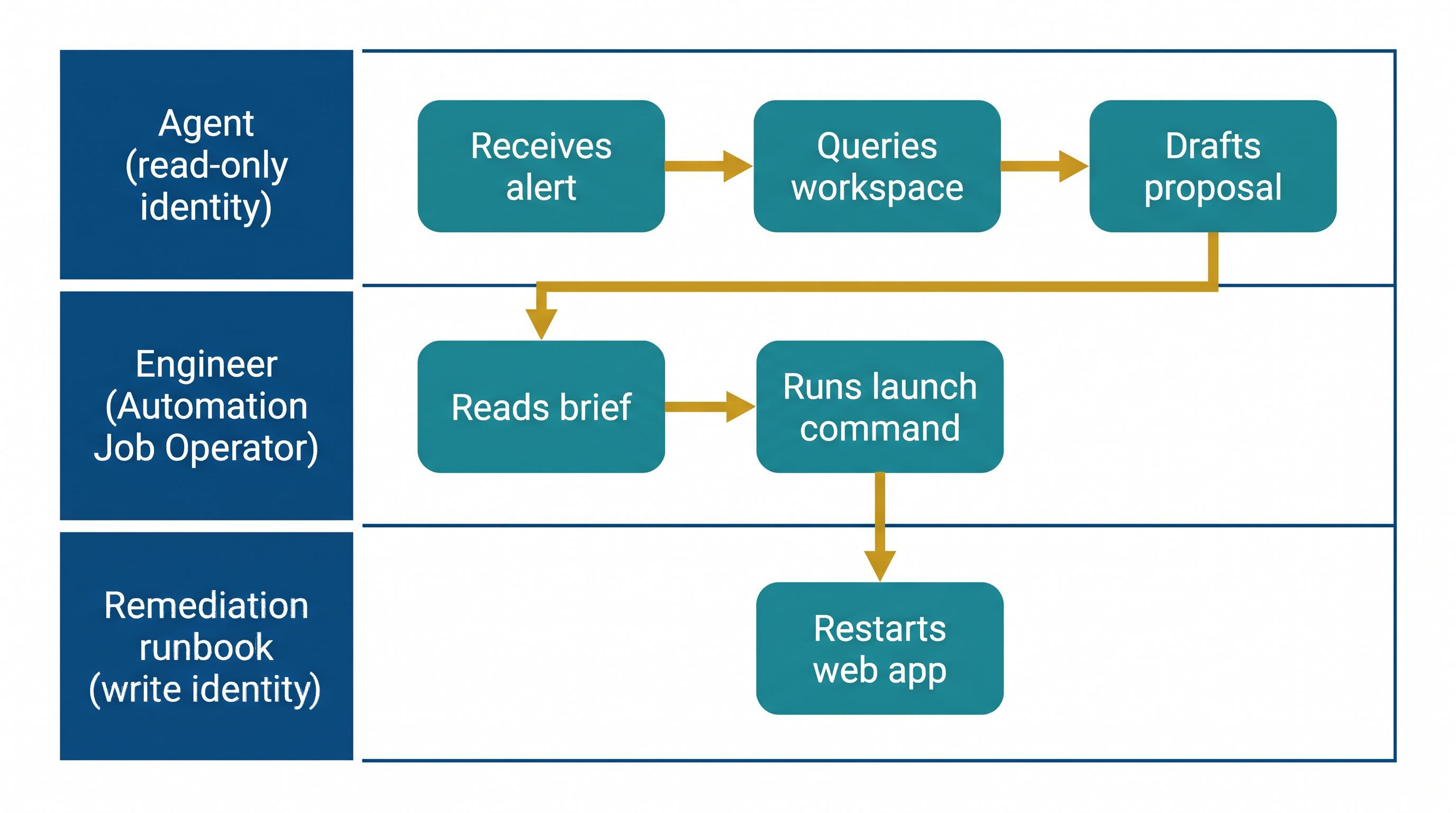
| Approving engineer | Microsoft Entra person or group | Automation Job Operator | Automation account |
| Remediation runbook | A second identification, by no means the agent’s | Web site Contributor (no built-in function is restart-only) | The net app |
| Motion group webhook | None; the URL token | Not relevant | Not relevant |
Scope the Log Analytics Reader task for the Invoke-IncidentAgent identification to 1 workspace. The workspace entry documentation says members of that function “can view all monitoring information and monitoring settings.” Scoping the function to the subscription would let one unhealthy alert learn unrelated workloads. Automation Job Operator lets the engineer begin jobs for each runbook within the Automation account. And anything you publish in that account is one command away from the approval function.
The remediation runbook wants its personal identification. An Automation account has one system-assigned identification, so a Restart-WebApp runbook within the agent’s account that indicators in with plain Join-AzAccount -Identification would run because the read-only agent, and giving that identification a write function defeats the cut up. Host Restart-WebApp in a second Automation account and provides that account’s system-assigned identification Web site Contributor on the internet app. The opposite choice is to connect a user-assigned identification to 1 account and sign up with Join-AzAccount -Identification -AccountId <ClientId>. That choice is a conference reasonably than a boundary, as a result of the identification is hooked up to the entire account and any runbook in it could possibly sign up with it. With a second account, set remediation.automationAccount in definitions.json to the account that hosts Restart-WebApp (the Step 3 script builds the launch command from it), assign the engineer Automation Job Operator on that account, and use its identify within the Step 5 job-check command. No built-in function grants solely the restart motion, and Web site Contributor is the closest match for a plain net app. A customized function is the one restart-only choice.
$resourceGroup = '<resource-group>'
$account = '<automation-account>'
$principalId = (Get-AzAutomationAccount -ResourceGroupName $resourceGroup -Title $account).Identification.PrincipalId
New-AzRoleAssignment -ObjectId $principalId -RoleDefinitionName 'Log Analytics Reader' -Scope '<workspace-resource-id>'
Warning: Verify that the identification holds nothing else earlier than the primary alert fires. Get-AzRoleAssignment -ObjectId $principalId | Choose-Object RoleDefinitionName, Scope ought to return one row, Log Analytics Reader on the workspace. Take away any write function that seems.
Give the Mannequin One Question Instrument
The mannequin’s solely device runs one named question.
Disable-AzContextAutosave -Scope Course of | Out-Null
Join-AzAccount -Identification | Out-Null
$workspaceId = Get-AutomationVariable -Title 'WorkspaceId'  # Step 4 creates this variable

operate Invoke-Diagnostic([string] $Title) {
    $diagnostic = $definition.diagnostics | The place-Object { $_.identify -eq $Title }
    if (-not $diagnostic) { return "No diagnostic named '$Title'." }
    $kql = $diagnostic.kql.Exchange('{resourceId}', $resourceId)
    $consequence = Invoke-AzOperationalInsightsQuery -WorkspaceId $workspaceId -Question $kql -Timespan (New-TimeSpan -Hours 2) -Wait 120
    $rows = @([System.Linq.Enumerable]::ToArray($consequence.Outcomes) | Choose-Object -First 20)
    if ($rows.Rely -eq 0) { return 'The question returned no rows.' }
    return ($rows | ConvertTo-Json -Depth 4 -Compress)
}
Join-AzAccount -Identification indicators in because the managed identification you simply scoped. Disable-AzContextAutosave -Scope Course of stops the job inheriting a saved Azure context. -Timespan units the two-hour window that an in the past() filter would in any other case set. -Wait units what number of seconds the question might run (service default 3 minutes, most 10 minutes) and, since Az.OperationalInsights 3.2.1, additionally units the cmdlet’s personal timeout. Elevating it’s the workaround the Invoke-AzOperationalInsightsQuery reference suggests for “The request was canceled as a result of configured HttpClient.Timeout of 100 seconds elapsing.” Capping rows with Choose-Object -First 20 additionally limits publicity, as a result of log strains carry textual content outsiders affect. The operate calling information warns: “Untrusted information in a operate’s output could possibly be used to instruct the mannequin to jot down operate calls in a method aside from you supposed.” However poisoned log strains can nonetheless reorder the queries or bias the abstract.
Step 3: Let the Mannequin Examine and Draft the Repair
The mannequin picks the order of your queries and turns their rows into a brief root trigger evaluation and a proposal. Microsoft’s operate calling information leaves execution to your software. Right here the script runs every question and returns the rows to the mannequin.
$endpoint = (Get-AutomationVariable -Title 'AoaiEndpoint').TrimEnd("https://adamtheautomator.com/")
$headers = @{ 'api-key' = (Get-AutomationVariable -Title 'AoaiKey') }
$deployment = Get-AutomationVariable -Title 'AoaiDeployment'

$instruments = @(@{
    sort = 'operate'
    operate = @{
        identify = 'run_diagnostic'
        description = 'Run one named read-only diagnostic question for the alerted useful resource.'
        parameters = @{
            sort = 'object'
            properties = @{ identify = @{ sort = 'string'; enum = @($definition.diagnostics.identify) } }
            required = @('identify')
        }
    }
})

$system = @(
    'You examine one Azure Monitor alert. Observe these steps so as:'
    $definition.steps
    'Cease situations:'
    $definition.stopConditions
    "It's possible you'll suggest solely the runbook '$($definition.remediation.runbook)' with these parameters: $($definition.remediation.allowedParameters -join ', ')."
    'When you might have sufficient proof, reply with JSON solely: {"abstract": "", "probable_cause": "", "proof": [""], "motion": {"runbook": "", "parameters": {}}}. Use null for motion if no repair is justified.'
) -join "`n"

$messages = @(
    @{ function = 'system'; content material = $system }
    @{ function = 'person'; content material = "Alert '$($necessities.alertRule)' ($($necessities.severity)) fired on $resourceId." }
)

for ($flip = 1; $flip -le 5; $flip++) {
    $physique = @{ mannequin = $deployment; messages = $messages; instruments = $instruments } | ConvertTo-Json -Depth 10
    $response = Invoke-RestMethod -Methodology Publish -Uri "$endpoint/openai/v1/chat/completions" -Headers $headers -ContentType 'software/json' -Physique $physique
    $reply = $response.selections[0].message
    $messages += $reply
    if (-not $reply.tool_calls) { break }
    foreach ($name in $reply.tool_calls) {
        $toolArgs = $name.operate.arguments | ConvertFrom-Json
        $messages += @{ function = 'device'; tool_call_id = $name.id; content material = (Invoke-Diagnostic $toolArgs.identify) }
    }
}
if ($reply.tool_calls) { throw 'The mannequin was nonetheless calling instruments after 5 turns.' }
The request follows the chat completions reference: a POST to {endpoint}/openai/v1/chat/completions with the important thing within the api-key header. The script provides each phrase of KQL; the enum solely lets the mannequin decide a diagnostic identify. After 5 turns the job fails.
Actuality Verify: If no diagnostic can see the trigger, the mannequin nonetheless writes a assured abstract from no matter rows it obtained. Learn the proof checklist earlier than you run the launch command.
This block parses the JSON, enforces the enable checklist, and builds the engineer’s launch command.
$proposal = $reply.content material | ConvertFrom-Json
$repair = $definition.remediation
$launch = 'No remediation proposed. The engineer decides.'
if ($proposal.motion) {
    if ($proposal.motion.runbook -ne $repair.runbook) { throw "Sudden runbook: $($proposal.motion.runbook)" }
    $names = @($proposal.motion.parameters.PSObject.Properties.Title | The place-Object { $_ })
    $outdoors = @($names | The place-Object { $repair.allowedParameters -notcontains $_ })
    if ($outdoors.Rely -gt 0) { throw "Parameters outdoors the enable checklist: $($outdoors -join ', ')" }
    $pairs = $names | ForEach-Object { "'{0}' = '{1}'" -f $_, ([string]$proposal.motion.parameters.$_).Exchange("'", "''") }
    $launch = "Begin-AzAutomationRunbook -ResourceGroupName '$($repair.resourceGroup)' -AutomationAccountName '$($repair.automationAccount)' -Title '$($repair.runbook)' -Parameters @{ $($pairs -join '; ') }"
}

$transient = [ordered]@{
    alert         = $necessities.alertRule
    severity      = $necessities.severity
    useful resource      = $resourceId
    abstract       = $proposal.abstract
    probableCause = $proposal.probable_cause
    proof      = $proposal.proof
    launch        = $launch
} | ConvertTo-Json -Depth 4
Write-Output $transient
Write-Output $launch
Invoke-RestMethod -Methodology Publish -Uri (Get-AutomationVariable -Title 'BriefUrl') -ContentType 'software/json' -Physique $transient | Out-Null
Invalid JSON makes ConvertFrom-Json throw, and so does any runbook identify or parameter outdoors the definition. Doubled single quotes hold a stray apostrophe from breaking out of the generated command. BriefUrl can level at any HTTP endpoint you personal, for instance a Logic Apps workflow with a “When a HTTP request is obtained” set off that posts to Groups. The transient additionally lands within the job output, the place the Step 4 take a look at reads it. Home windows PowerShell 5.1 (the runbook runtime) makes ConvertTo-Json escape each single quote as u0027, so the launch line contained in the JSON can’t be pasted as-is. Write-Output $launch prints the identical command as plain textual content on the finish of the job output.
Step 4: Wire the Alert to the Agent and Take a look at It
Save Steps 1 to three as Invoke-IncidentAgent.ps1, then publish it and retailer its settings. The import makes use of -Kind PowerShell (the PowerShell 5 runtime the webhook web page recommends for webhook enter) as an alternative of PowerShell72. The important thing and transient URL go in as encrypted variables.
$widespread = @{ ResourceGroupName = $resourceGroup; AutomationAccountName = $account }
Import-AzAutomationRunbook @widespread -Path ./Invoke-IncidentAgent.ps1 -Title Invoke-IncidentAgent -Kind PowerShell -Revealed -Pressure

$settings = @{
    WorkspaceId        = '<workspace-id>'
    AoaiEndpoint       = 'https://<resource-name>.openai.azure.com'
    AoaiDeployment     = '<deployment-name>'
    RunbookDefinitions = (Get-Content material ./definitions.json -Uncooked)
}
foreach ($identify in $settings.Keys) {
    New-AzAutomationVariable @widespread -Title $identify -Encrypted $false -Worth $settings[$name]
}
New-AzAutomationVariable @widespread -Title AoaiKey -Encrypted $true -Worth '<model-api-key>'
New-AzAutomationVariable @widespread -Title BriefUrl -Encrypted $true -Worth '<https-endpoint-you-own>'
The webhook URL is the one credential on this path, and the Azure Automation webhooks article says: “The URL incorporates a safety token that permits a third-party system to invoke the runbook with no additional authentication. For that reason, it is best to deal with the URL like a password.” New-AzAutomationWebhook returns the URL solely as soon as; $uri retains it for the motion group.
$webhook = New-AzAutomationWebhook @widespread -Title incident-agent-hook -RunbookName Invoke-IncidentAgent -IsEnabled $true -ExpiryTime ([DateTimeOffset]::UtcNow.AddMonths(6)) -Pressure
$uri = $webhook.WebhookURI

az monitor motion-group create --identify ag-incident-agent --useful resource-group $resourceGroup --brief-identify incagent --motion webhook incident-agent $uri usecommonalertschema
Warning: The Step 4 New-AzAutomationVariable and New-AzAutomationWebhook instructions retailer a mannequin key and create a webhook that may begin a runbook. Each take a look at payments your mannequin deployment for tokens.
usecommonalertschema permits the widespread schema, set per motion. Add the six-month expiry date to the on-call calendar. The Automation webhook reference warns: “As soon as a webhook has expired, you possibly can’t reactivate it. You’ll be able to solely take away after which recreate it.”
Wire the Alert Rule to the Motion Group
The az monitor metrics alert replace reference describes --add-action as an motion group plus non-obligatory KEY=VAL webhook properties. This rule sends runbook=app-service-5xx as considered one of them.
$actionGroupId = az monitor motion-group present --identify ag-incident-agent --useful resource-group $resourceGroup --question id --output tsv
az monitor metrics alert replace --identify '<alert-rule-name>' --useful resource-group '<app-resource-group>' --add-action "$actionGroupId runbook=app-service-5xx"
Cross the group ID and the property as one quoted argument. Azure CLI 2.85.0 exits with out an error however drops the property when they’re separate arguments. Verify it landed:
az monitor metrics alert present --identify '<alert-rule-name>' --useful resource-group '<app-resource-group>' --question "actions[].webHookProperties"The output is an inventory with one object:
[
  {
    "runbook": "app-service-5xx"
  }
]
The error “The alert has no runbook customized property” means the pair didn’t attain customProperties. Preserve your paging group on the rule in case the agent fails: as much as 5 motion teams run concurrently on one rule.
Replay a Pretend Incident
Use an actual net app with exercise for the diagnostics to learn.
$testPayload = @'
{
  "schemaId": "azureMonitorCommonAlertSchema",
  "information": {
    "necessities": {
      "alertRule": "orders-api-5xx",
      "severity": "Sev2",
      "monitorCondition": "Fired",
      "alertTargetIDs": ["/subscriptions/<subscription-id>/resourceGroups/<app-resource-group>/providers/Microsoft.Web/sites/<app-name>"],
      "originAlertId": "test-0001"
    },
    "customProperties": { "runbook": "app-service-5xx" }
  }
}
'@
$response = Invoke-WebRequest -Methodology Publish -Uri $uri -Physique $testPayload -UseBasicParsing
$jobId = (ConvertFrom-Json $response.Content material).JobIds[0]
do {
    Begin-Sleep -Seconds 15
    $job = Get-AzAutomationJob @widespread -Id $jobId
} whereas ($job.Standing -notin 'Accomplished', 'Failed', 'Stopped', 'Suspended')
$job.Standing
Get-AzAutomationJobOutput @widespread -Id $jobId -Stream Output
A profitable POST returns 202 and {"JobIds":["<JobId>"]}. The loop checks each 15 seconds till the job reaches a closing standing, then prints the transient, which has this form (the u0027 sequences are how PowerShell 5.1 escapes single quotes):
{
  "alert": "orders-api-5xx",
  "severity": "Sev2",
  "useful resource": "/subscriptions/<subscription-id>/resourceGroups/<app-resource-group>/suppliers/Microsoft.Net/websites/<app-name>",
  "abstract": "<the mannequin's brief root trigger evaluation>",
  "probableCause": "<the trigger the mannequin names>",
  "proof": ["<the rows the model cites>"],
  "launch": "Begin-AzAutomationRunbook -ResourceGroupName u0027<resource-group>u0027 ... or: No remediation proposed. The engineer decides."
}
The job output ends with the launch worth once more as a plain line, however the console wraps it throughout indented strains. Run this command to print it as one string, then copy its output, not the escaped one contained in the JSON:
(Get-AzAutomationJobOutput @widespread -Id $jobId -Stream Output)[-1].AbstractFailed means a variable or the runbook property is lacking, or the mannequin hit the five-turn cap; Get-AzAutomationJobOutput @widespread -Id $jobId -Stream Error reveals which. To tear down, run:
az monitor metrics alert replace --identify '<alert-rule-name>' --useful resource-group '<app-resource-group>' --remove-actions $actionGroupId
Take away-AzAutomationWebhook @widespread -Title incident-agent-hook
'WorkspaceId', 'AoaiEndpoint', 'AoaiDeployment', 'RunbookDefinitions', 'AoaiKey', 'BriefUrl' | ForEach-Object { Take away-AzAutomationVariable @widespread -Title $_ }
Take away-AzRoleAssignment -ObjectId $principalId -RoleDefinitionName 'Log Analytics Reader' -Scope '<workspace-resource-id>'
az monitor motion-group delete --identify ag-incident-agent --useful resource-group $resourceGroup
The (Get-AzAutomationJobOutput @widespread -Id $jobId -Stream Output)[-1].Abstract command from Step 4 prints the launch command as one plain line, the identical textual content because the transient’s launch area, formed like this:
Begin-AzAutomationRunbook -ResourceGroupName '<resource-group>' -AutomationAccountName '<automation-account>' -Title 'Restart-WebApp' -Parameters @{ 'AppName' = '<app-name>' }Approval occurs when the engineer reads the proof and runs that command. In keeping with the cmdlet reference, Begin-AzAutomationRunbook returns a job by default and waits solely with -Wait. Constructing an approval button would take a callback URL, saved approval state, and a second webhook. The engineer’s Automation Job Operator function is what lets them begin the repair, supplied additionally they have learn permission on the useful resource group that holds the Automation account. Every identification within the diagram under holds a special permission.
To verify the repair ran, checklist the Restart-WebApp jobs from the final 10 minutes and search for Accomplished:
Get-AzAutomationJob -ResourceGroupName '<resource-group>' -AutomationAccountName '<automation-account>' -RunbookName 'Restart-WebApp' -StartTime (Get-Date).AddMinutes(-10) | Choose-Object JobId, StandingIf the 5xx fee then drops and the rule resolves, Azure Monitor sends a Resolved notification, which Invoke-IncidentAgent logs and ignores.
Microsoft’s operate calling information additionally recommends confirming an motion earlier than it runs. The launch command performs that function right here.
Azure SRE Agent or Your Personal Agent
Microsoft has a managed model of an alert-driven incident-response agent. The Azure SRE Agent overview describes it as discovering possible causes for an incident and proposing mitigations, or operating them while you configure it to.
| Resolution | Customized agent (this put up) | Azure SRE Agent |
|---|---|---|
| Alert consumption | Any alert that reaches an motion group webhook | Azure Monitor Alerts, PagerDuty, or ServiceNow |
| Approval | Nothing runs till an engineer begins the remediation runbook | Evaluate mode asks approval for Azure infrastructure operations |
| Your procedures | Runbook definitions you write and model | Abilities, together with market runbooks, plus customized brokers and hooks |
| Repairs | You personal the script, prompts, mannequin key, and checks | You configure an incident response plan and permissions |
The run modes web page says evaluate mode reveals approval buttons “just for Azure infrastructure operations.” Sending e mail or posting to Groups proceeds with out one.
For those who undertake the SRE Agent, the run modes steerage recommends beginning in evaluate mode and, after two to 4 weeks, transferring solely the triggers you constantly approve to Autonomous. When your incidents reside in PagerDuty or ServiceNow, decide the SRE Agent. Your individual construct matches when Azure RBAC should gate a command you possibly can learn, or when your procedures exist as recordsdata.
What to Tighten Earlier than Actual Alerts Arrive
The Step 4 take a look at payload by no means workout routines the duplicate deliveries and webhook expiry that actual alert streams deliver.
| Failure | What goes improper | Guard |
|---|---|---|
| Duplicate deliveries or an alert storm | Two jobs and two token payments for one incident, or one job per alert from a flapping rule | Retailer originAlertId in an Automation variable and skip repeats inside a cooldown window (not within the pattern); key the identical cooldown on alertRule and cut up alerts by dimension |
| Expired webhook | Alerts cease reaching the agent with out an error, as a result of an expired webhook can’t be reactivated | A rotation date, plus an alert on failed or lacking jobs for Invoke-IncidentAgent |
Replay a payload for a useful resource with a current deployment and ensure the cease situation withholds the restart. Monitor how typically engineers approve the launch command, as a result of that ratio reveals whether or not your diagnostics can see the trigger. Begin with one definition on one rule and add the following as soon as engineers approve its launch instructions.

