


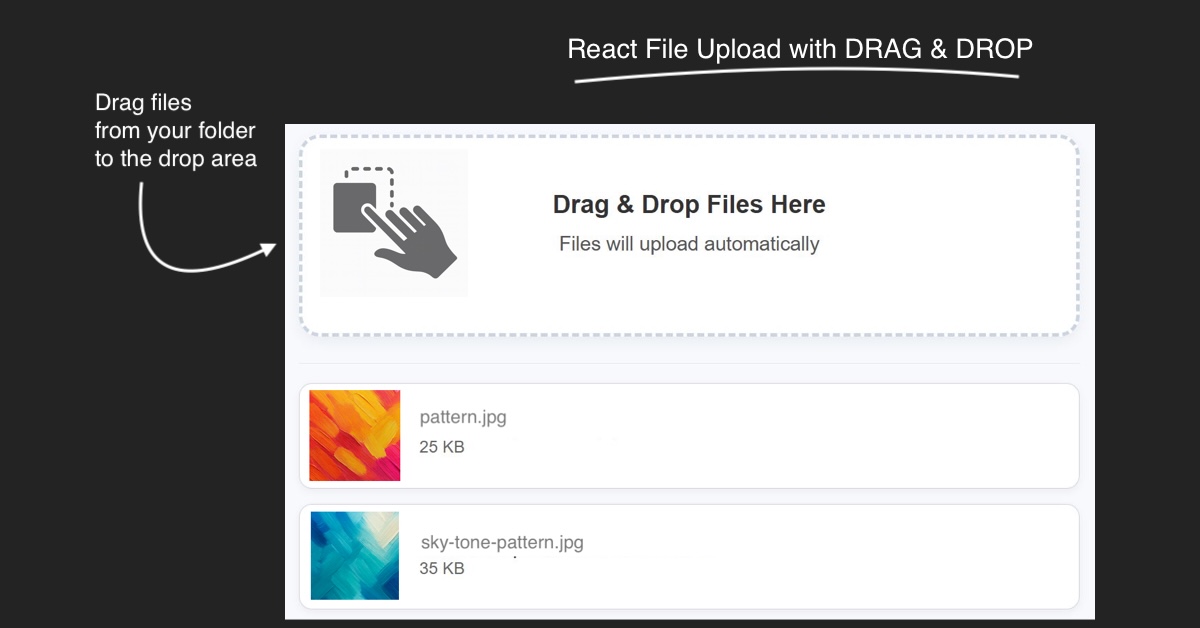
This instance comprises a React drag-and-drop file add with file kind and measurement validation. It connects backend to add recordsdata to the server by way of Axios.
The workflow permits customers to drop recordsdata to add and exhibits file preview beneath the drop space. This file add instance consists of the next featured functionalities.
- Drag and drop
- File validation
- Importing to backend
- Saving file path to database
- Preview after add
- Error dealing with
It’s simple to combine into any React software, since it’s structured with separate elements for the add and preview UI.

React UI with file add interface
Two React elements created for this file add UI. These are UploadBox and FilePreview.
The UploadBox is the drop space for dragged recordsdata to be uploaded. As soon as add accomplished, file thumbnails are proven in a preview field through the use of the FilePreview part.
The FileUpload JSX handles the next processes earlier than importing a file.
- File validation about its extension and measurement.
- Dealing with errors or success acknowledgement for UI.
- Making ready kind knowledge with the file binaries.

src/elements/FileUpload.jsx
import { useState } from "react";
import axios from "axios";
import SERVER_SIDE_API_ROOT from "../../config";
import FilePreview from "./FilePreview";
import UploadBox from "./UploadBox";
import "../../public/belongings/css/type.css";
const FileUpload = () => {
  const [files, setFiles] = useState([]);
  const [dragActive, setDragActive] = useState(false);
  const [uploading, setUploading] = useState(false);
  const [errorMsg, setErrorMsg] = useState("");
  const allowedExtensions = ["jpg", "jpeg", "png", "gif", "pdf", "doc", "docx", "txt"];
  const MAX_FILE_SIZE = 2 * 1024 * 1024;

  const uploadFiles = async (fileList) => {
    setErrorMsg("");
    const safeFiles = [];
    const rejectedFiles = [];

    fileList.forEach((file) => {
      const ext = file.identify.break up(".").pop().toLowerCase();
      if (!allowedExtensions.consists of(ext)) return rejectedFiles.push("Invalid file kind");
      if (file.measurement > MAX_FILE_SIZE) return rejectedFiles.push("Most file measurement is 2MB.");
      if (file.measurement <= 0) return rejectedFiles.push("Empty file");
      safeFiles.push(file);
    });
    if (rejectedFiles.size > 0) {
      setErrorMsg(rejectedFiles[0]);
      setUploading(false);
      return;
    }
    if (!safeFiles.size) return;
    const formData = new FormData();
    safeFiles.forEach((file) => formData.append("recordsdata[]", file));
    setUploading(true);

    const delay = new Promise((resolve) => setTimeout(resolve, 800));
    attempt {
      const res = await Promise.all([
        axios.post(`${SERVER_SIDE_API_ROOT}/file-upload.php`, formData, {
          headers: { "Content-Type": "multipart/form-data" },
        }),
        delay,
      ]);
      const uploadedFiles = res[0].knowledge.recordsdata.filter((f) => f.standing === "uploaded");
      setFiles((prev) => [...prev, ...uploadedFiles.map(f => safeFiles.find(sf => sf.name === f.name))]);
    } catch {
      setErrorMsg("Server error — please attempt once more later.");
    }
    setUploading(false);
  };
  const handleDrop = async (e) => {
    e.preventDefault();
    setDragActive(false);
    await uploadFiles(Array.from(e.dataTransfer.recordsdata));
  };
  return (
    <div className="upload-wrapper">
      <UploadBox
        dragActive={dragActive}
        importing={importing}
        errorMsg={errorMsg}
        handleDrop={handleDrop}
        setDragActive={setDragActive}
      >
      </UploadBox>
      <FilePreview recordsdata={recordsdata} importing={importing} />
    </div>
  );
};
export default FileUpload;
PHP file add endpoint
The PHP script validates the acquired file binary earlier than importing to the server listing. If the validation passes, this script give identify to the file with a distinctive random id.
As soon as the PHP move_uploaded_file() saves the recordsdata to the listing, this code inserts the goal path to the database.
drag-drop-file-upload-api/file-upload.php
<?php
header("Entry-Management-Enable-Origin: *");
header("Entry-Management-Enable-Strategies: POST, GET, OPTIONS");
header("Entry-Management-Enable-Headers: Content material-Sort");
embrace "db.php";
$uploadDir = "uploads/";
$response = [];
if (!file_exists($uploadDir)) {
    mkdir($uploadDir, 0777, true);
}
$allowedExtensions = ['jpg', 'jpeg', 'png', 'gif', 'pdf', 'txt', 'doc', 'docx'];
$maxFileSize = 2 * 1024 * 1024;
foreach ($_FILES['files']['name'] as $key => $identify) {
    $tmpName = $_FILES['files']['tmp_name'][$key];
    $extension = strtolower(pathinfo($identify, PATHINFO_EXTENSION));
    $measurement = $_FILES['files']['size'][$key];
    if (!in_array($extension, $allowedExtensions)) {
        $response[] = [
            "name" => $name,
            "status" => "blocked",
            "message" => "File type not allowed (.{$extension})"
        ];
        proceed;
    }
    if ($measurement > $maxFileSize) {
        $response[] = [
            "name" => $name,
            "status" => "blocked",
            "message" => "Maximum file size is 2M."
        ];
        proceed;
    }
    if ($measurement <= 0) {
        $response[] = [
            "name" => $name,
            "status" => "blocked",
            "message" => "Empty file"
        ];
        proceed;
    }
    $uniqueName = uniqid() . "_" . basename($identify);
    $targetPath = $uploadDir . $uniqueName;

    if (move_uploaded_file($tmpName, $targetPath)) {
        $stmt = $conn->put together("INSERT INTO uploaded_files (file_name, file_path) VALUES (?, ?)");
        $stmt->bind_param("ss", $uniqueName, $targetPath);
        $stmt->execute();
        $response[] = [
            "name" => $name,
            "path" => $targetPath,
            "status" => "uploaded"
        ];
    } else {
        $response[] = [
            "name" => $name,
            "status" => "failed",
            "message" => "Error moving uploaded file."
        ];
    }
}
echo json_encode(["success" => true, "files" => $response]);
?>
Drop space to put the dragged recordsdata
It comprises UI components to outline the file drop space. The drop field makes use of onDragOver callback to spotlight the drop space on hover.
And, the onDrop callback prepares the shape knowledge to publish the dropped file binary to the server.

src/elements/UploadBox.jsx
const UploadBox = ({ dragActive, importing, errorMsg, handleDrop, setDragActive }) => (
  <>
    <div
      className={`upload-box ${dragActive ? "lively" : ""}`}
      onDragOver={(e) => {
        e.preventDefault();
        setDragActive(true);
      }}
      onDragLeave={() => setDragActive(false)}
      onDrop={handleDrop}
      >
      <h3 className="upload-title">Drag & Drop Information Right here</h3>
      <p className="upload-text">Information will add robotically</p>
    </div>
    {importing && <p className="uploading-text">Importing...</p>}
    {errorMsg && <p className="error-text">{errorMsg}</p>}
 </>
);

export default UploadBox;
Exhibiting file preview with thumbnails
The FilePreview part shows the uploaded recordsdata in a listing format. It should present its thumbnail, identify and measurement.
If a picture add, the preview will present the picture thumbnail. It a doc kind file is uploaded, the default icon is proven to the preview display.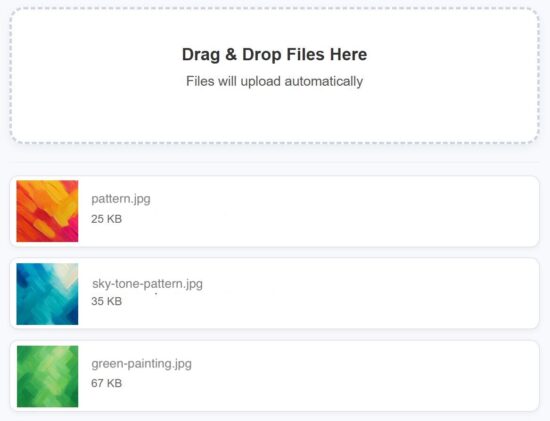
src/elements/FilePreview.jsx
const FilePreview = ({ recordsdata, importing }) => {
  if (!recordsdata.size) return null;
  return (
    <div className="preview-list">
      {recordsdata.map((file, i) => (
        <div key={i} className="preview-row">
          {file.kind?.startsWith("picture/") ? (
            <div className="preview-thumb-wrapper">
              <img
                src={URL.createObjectURL(file)}
                alt={file.identify}
                className={`preview-thumb ${importing ? "blurred" : ""}`}
              />
              {importing && ( <div className="preview-loader">
                <img src="https://phppot.com/belongings/picture/loader.svg" alt="Loading..." />
               </div>
              )}
            </div>
          ) : (
            <div className="file-icon"></div>
          )}
          <div className="file-info">
            <p className="file-name">{file.identify}</p>
            <p className="file-size">{Math.spherical(file.measurement / 1024)} KB</p>
          </div>
        </div>
      ))}
    </div>
  );
};
export default FilePreview;
The best way to arrange this software
The beneath steps assist to arrange this instance to run in your atmosphere. After these steps, begin the npm dev server and run the React drag and drop app.
- Obtain the supply and unzip into your laptop.
- Copy the
drag-drop-file-upload-apiinto the PHP internet root. - Create a database
file_upload_dband import the SQL script within thedrag-drop-file-upload-api/sql - Configure database particulars with
db.php - Configure the PHP endpoint URL in React in
src/config.js
Conclusion
I hope the React code offers a contemporary file add interface. The drag-and-drop, file validation, preview rendering and database insert is a stack of options enriches the instance code. This code well-structured and able to combine with an software simply. If you would like any add-on characteristic to this instance, please let me know.
References:

