


Shrink a clean 65,536-color gradient right into a LibGD palette picture and 256 colours survive. Shrink the identical gradient right into a true-color picture and 16,384 survive. LibGD can do each, and its oldest examples use the palette form. That one alternative decides whether or not a generated chart or thumbnail appears to be like clear or banded, and it is just considered one of a handful of particulars that separate a working LibGD program from one which leaks reminiscence, crashes on a foul add or writes damaged information on Home windows.
This information exhibits create photos in C with LibGD: set up it on Linux, macOS and Home windows, draw a primary picture, and put it aside as PNG and JPEG. It then builds three actual instruments, a bar chart for a report, a thumbnail maker for uploads that rejects outsized photos earlier than decoding them, and a default avatar (identicon) generator. Then it covers the errors that break LibGD applications in observe. Each program was compiled and examined with GCC and Clang on Ubuntu and with MSVC on Home windows, and each output on this web page is this system’s actual output.
What Is LibGD?
LibGD (the GD Graphics Library) is an open-source C library for creating and enhancing photos from code. A program creates a picture in reminiscence, attracts traces, shapes and textual content on it, copies and resizes different photos into it, and saves the end result as PNG, JPEG, GIF, WebP or one other format. It’s used to generate charts, thumbnails and different photos on the fly.
LibGD was written by Thomas Boutell and is maintained in the present day as an open-source challenge at libgd.github.io. Language bindings exist for Perl, PHP and others, so the features beneath look acquainted to anybody who has used PHP’s imagecreatetruecolor() or imagepng(). The present launch is 2.3.3, from September 2021; it’s what Ubuntu 24.04 and vcpkg ship, and what this text was examined with.
| Job | LibGD features |
|---|---|
| Create a picture | gdImageCreateTrueColor(), gdImageCreate() (palette) |
| Load a picture | gdImageCreateFromFile(), gdImageCreateFromPng(), gdImageCreateFromJpeg() |
| Draw | gdImageLine(), gdImageFilledRectangle(), gdImageFilledEllipse(), gdImageFilledPolygon(), gdImageSetThickness() |
| Textual content | gdImageString() (built-in fonts), gdImageStringFT() (TrueType, via FreeType) |
| Resize and replica | gdImageCopyResampled(), gdImageCopyResized(), gdImageScale() |
| Save | gdImagePng(), gdImageJpeg(), gdImageFile(), or gdImagePngPtr() for a buffer in reminiscence |
| Free | gdImageDestroy() for photos, gdFree() for buffers LibGD returns |
Every file format comes from a separate library: libpng and zlib for PNG, libjpeg for JPEG, FreeType for TrueType textual content. A LibGD construct helps a format provided that it was constructed with that library, which issues on Home windows, the place you select the options while you set up it.
Find out how to Set up LibGD and Compile a Program
| System | Set up | Compile |
|---|---|---|
| Ubuntu, Debian | sudo apt set up libgd-dev |
cc prog.c $(pkg-config --cflags --libs gdlib) |
| Fedora | sudo dnf set up gd-devel |
the identical |
| macOS (Homebrew) | brew set up gd |
the identical |
| Home windows (vcpkg, MSVC) | vcpkg set up "libgd[core,png,jpeg,freetype]:x64-windows" |
CMake with vcpkg’s toolchain file |
On Linux, pkg-config provides the embody path and -lgd; the order issues, so put the libraries after the supply file. On Home windows, [core,png,jpeg,freetype] selects solely the codecs used right here. A plain vcpkg set up libgd additionally builds AVIF, TIFF, WebP and Fontconfig help, which takes for much longer. The companion repository’s CMakeLists.txt finds LibGD each methods: via pkg-config the place it exists, and thru find_path() and find_library() with vcpkg’s toolchain file on Home windows.
Your First Picture in C with LibGD
To create a picture with LibGD, name gdImageCreateTrueColor(width, peak), draw on the picture, open a file with fopen(path, "wb"), write it with gdImagePng() or gdImageJpeg(), shut the file, and free the picture with gdImageDestroy(). Here’s a full program:
/* first_image: the smallest helpful LibGD program. It attracts on a 320 x 200
   true-color picture and saves it as PNG and as JPEG.

   Construct:  cc first_image.c -lgd -o first_image */
#embody <gd.h>
#embody <gdfontl.h>
#embody <stdio.h>

static int save(gdImagePtr im, const char *path, int is_png)
{
    FILE *out = fopen(path, "wb");             /* binary mode, all the time */
    if (out == NULL) {
        perror(path);
        return -1;
    }
    if (is_png)
        gdImagePng(im, out);
    else
        gdImageJpeg(im, out, 85);              /* high quality 0-100 */
    return fclose(out) == 0 ? 0 : -1;
}

int foremost(void)
{
    gdImagePtr im = gdImageCreateTrueColor(320, 200);
    if (im == NULL) {
        fprintf(stderr, "out of memoryn");
        return 1;
    }

    /* In a true-color picture a shade is only a packed RGB worth. */
    int sky = gdTrueColor(0xDC, 0xEB, 0xF7);
    int blue = gdTrueColor(0x1A, 0x6F, 0xD4);
    int inexperienced = gdTrueColor(0x46, 0x7F, 0x40);
    int darkish = gdTrueColor(0x1F, 0x29, 0x37);

    gdImageFilledRectangle(im, 0, 0, 319, 199, sky);          /* background */
    gdImageFilledRectangle(im, 0, 150, 319, 199, inexperienced);      /* floor */
    gdImageFilledEllipse(im, 260, 50, 60, 60, gdTrueColor(0xF2, 0xC1, 0x4E));
    gdImageFilledRectangle(im, 40, 90, 140, 150, blue);       /* a home */
    gdPoint roof[3] = {{30, 90}, {90, 50}, {150, 90}};
    gdImageFilledPolygon(im, roof, 3, darkish);
    gdImageSetThickness(im, 3);
    gdImageLine(im, 180, 150, 300, 110, darkish);                /* a thick line */
    gdImageSetThickness(im, 1);
    gdImageString(im, gdFontGetLarge(), 10, 10, (unsigned char *)"Made with LibGD", darkish);

    int rc = save(im, "first.png", 1) == 0 && save(im, "first.jpg", 0) == 0 ? 0 : 1;
    gdImageDestroy(im);                        /* free the pixels */
    if (rc == 0)
        printf("wrote first.png and first.jpg (%d x %d)n", 320, 200);
    return rc;
}
Output of first_image:
wrote first.png and first.jpg (320 x 200)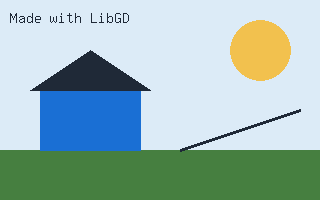
A number of guidelines from this program apply to each LibGD program:
- Coordinates begin on the top-left nook, with y rising downward, and the bottom-right pixel of a 320 × 200 picture is (319, 199).
gdImageCreateTrueColor()can returnNULL, for instance when the picture is just too massive for the reminiscence out there. Test it.- In a true-color picture a shade is a packed RGB worth.
gdTrueColor(r, g, b)builds it, and you may cross it straight to any drawing perform. - Open picture information in binary mode,
"wb". Mistake 1 beneath exhibits what"w"does on Home windows. - Each picture wants
gdImageDestroy(), or its pixels leak.
The check suite reads the information again to test them. imgcheck reviews the format from the file’s first bytes, the scale, and the colours of chosen pixels, right here the sky, the home and the bottom:
Output of imgcheck:
first.png: PNG 320x200
  (0, 0) #DCEBF7
  (90, 120) #1A6FD4
  (300, 180) #467F40
PNG is lossless, so the colours come again precisely. JPEG is lossy, and the identical three pixels in first.jpg are every off by one in a single or two shade channels:
Output of imgcheck:
first.jpg: JPEG 320x200
  (0, 0) #DDEBF8
  (90, 120) #196FD4
  (300, 180) #477F40
The distinction is invisible right here, however JPEG additionally blurs sharp edges such because the roof and the textual content. Use PNG for charts, diagrams and something with textual content, and JPEG for pictures.
Palette or True Colour?
LibGD has two sorts of picture, and selecting the fallacious one is the most typical reason behind poor-looking output.
| Property | Palette picture | True-color picture |
|---|---|---|
| Created with | gdImageCreate() |
gdImageCreateTrueColor() |
| Colours | At most 256, in a desk | Any of 16.7 million, saved per pixel |
| A shade worth is | An index into the desk, from gdImageColorAllocate() |
A packed RGB worth, from gdTrueColor() |
| Background | The primary shade allotted | Black, till you fill it |
| Reminiscence per pixel | 1 byte | 4 bytes |
| Good for | Small icons, GIFs, photos with few flat colours | Photographs, thumbnails, gradients, antialiased drawing |
This program exhibits each limits. It tries to allocate 300 colours in a palette picture, then shrinks a clean 512 × 512 gradient right into a 128 × 128 picture of every form:
int foremost(void)
{
    /* 1. A palette picture holds 256 colours; the 257th allocation fails. */
    gdImagePtr pal = gdImageCreate(16, 16);
    if (pal == NULL)
        return 1;
    int okay = 0, failed = 0;
    for (int i = 0; i < 300; i++) {
        int c = gdImageColorAllocate(pal, i % 256, i / 256 * 100, 50);
        if (c == -1)
            failed++;
        else
            okay++;
    }
    printf("palette picture: %d colours allotted, %d allocations returned -1n", okay, failed);
    gdImageDestroy(pal);

    /* 2. Shrink a clean 512 x 512 gradient into every type of picture. */
    gdImagePtr src = gdImageCreateTrueColor(512, 512);
    if (src == NULL)
        return 1;
    for (int y = 0; y < 512; y++)
        for (int x = 0; x < 512; x++)
            gdImageSetPixel(src, x, y, gdTrueColor(x / 2, y / 2, 128));
    printf("supply gradient: %ld colorsn", count_colors(src));

    gdImagePtr to_tc = gdImageCreateTrueColor(128, 128);
    gdImagePtr to_pal = gdImageCreate(128, 128);
    if (to_tc == NULL || to_pal == NULL)
        return 1;
    gdImageCopyResampled(to_tc, src, 0, 0, 0, 0, 128, 128, 512, 512);
    gdImageCopyResampled(to_pal, src, 0, 0, 0, 0, 128, 128, 512, 512);
    printf("resampled right into a true-color picture: %ld colorsn", count_colors(to_tc));
    printf("resampled right into a palette picture:    %ld colorsn", count_colors(to_pal));
    gdImageDestroy(src);
    gdImageDestroy(to_tc);
    gdImageDestroy(to_pal);
    return 0;
}
Output of pitfall_palette_limits:
palette picture: 256 colours allotted, 44 allocations returned -1
supply gradient: 65536 colours
resampled right into a true-color picture: 16384 colours
resampled right into a palette picture:    256 colours
The palette picture stopped accepting colours at 256, and gdImageColorAllocate() returned −1 for the opposite 44, which a program that doesn’t test would then use as a shade. The resampled gradient stored 16,384 colours within the true-color picture and solely 256 within the palette picture, which exhibits up as seen bands. Use true-color photos until you could have a motive to not. Reminiscence is the one value: a 4,000 × 3,000 picture takes about 48 MB as a true-color picture.
Actual-Life Instance: Producing a Chart Picture
Dashboards, nightly reviews and monitoring emails want charts as picture information, typically generated on a server with no show. This program reads month-to-month obtain counts and attracts a bar chart as a PNG. The information file:
# month downloads
Jan 1200
Feb 1850
Mar 2400
Apr 2100
Might 3150
Jun 2900
The drawing perform computes every bar’s peak in pixels, attracts grid traces and labels with LibGD’s built-in fonts, and makes use of a TrueType font for the title when one is obtainable:
int bar_height_px(lengthy worth, lengthy max, int plot_h)
{
    if (max <= 0)
        return 0;
    return (int)((worth * plot_h + max / 2) / max);
}
gdImagePtr draw_bar_chart(const bar *bars, int n, int width, int peak,
const char *title, const char *font_path, int *used_freetype)
{
if (n < 1 || width < CHART_LEFT + CHART_RIGHT + n || peak < CHART_TOP + CHART_BOTTOM + 10)
return NULL;
gdImagePtr im = gdImageCreateTrueColor(width, peak);
if (im == NULL)
return NULL;
int white = gdTrueColor(255, 255, 255), darkish = gdTrueColor(0x1F, 0x29, 0x37);
int gray = gdTrueColor(0x6B, 0x72, 0x80), grid = gdTrueColor(0xE5, 0xE7, 0xEB);
int blue = gdTrueColor(CHART_BAR_COLOR >> 16, CHART_BAR_COLOR >> 8 & 0xFF, CHART_BAR_COLOR & 0xFF);
gdImageFilledRectangle(im, 0, 0, width - 1, peak - 1, white);
int x0 = CHART_LEFT, x1 = width - CHART_RIGHT, base = peak - CHART_BOTTOM;
int plot_h = base - CHART_TOP;
lengthy max = 0;
for (int i = 0; i < n; i++)
if (bars[i].worth > max)
max = bars[i].worth;
/* Grid traces and their values at 0, 1/4, 1/2, 3/4 and the utmost. */
char textual content[32];
for (int ok = 0; ok <= 4; ok++) {
int y = base - plot_h * ok / 4;
if (ok > 0)
gdImageLine(im, x0 + 1, y, x1, y, grid);
snprintf(textual content, sizeof textual content, "%ld", max * ok / 4);
gdFontPtr f = gdFontGetSmall();
gdImageString(im, f, x0 - 6 - (int)strlen(textual content) * f->w, y - f->h / 2, (unsigned char *)textual content, gray);
}
int slot = (x1 - x0) / n, bw = slot * 3 / 5;
for (int i = 0; i < n; i++) {
int bh = bar_height_px(bars[i].worth, max, plot_h);
int bx = x0 + i * slot + (slot - bw) / 2, cx = bx + bw / 2;
if (bh > 0)
gdImageFilledRectangle(im, bx, base - bh, bx + bw - 1, base - 1, blue);
snprintf(textual content, sizeof textual content, "%ld", bars[i].worth);
centered_string(im, gdFontGetTiny(), cx, base - bh - 12, textual content, darkish);
centered_string(im, gdFontGetSmall(), cx, base + 8, bars[i].label, darkish);
}
gdImageLine(im, x0, CHART_TOP, x0, base, darkish); /* axes */
gdImageLine(im, x0, base, x1, base, darkish);
int ft = 0;
if (title != NULL && font_path != NULL) {
int field[8];
char *err = gdImageStringFT(NULL, field, darkish, (char *)font_path, 14.0, 0.0, 0, 0, (char *)title);
if (err == NULL) { /* measured: now draw it centered */
int tw = field[2] - field[0];
err = gdImageStringFT(im, field, darkish, (char *)font_path, 14.0, 0.0, (width - tw) / 2, 26, (char *)title);
ft = err == NULL;
}
}
if (title != NULL && !ft)
centered_string(im, gdFontGetLarge(), width / 2, 12, title, darkish);
if (used_freetype != NULL)
*used_freetype = ft;
return im;
}/* chart: attracts a bar chart as a PNG file from "label worth" traces, the
type of picture an online dashboard or a nightly report generates on the fly.
utilization: chart DATA OUT.png [FONT.ttf]
With a TrueType font (and LibGD constructed with FreeType) the title makes use of it. */
#embody "imgtools.h"
#embody <stdio.h>
int foremost(int argc, char **argv)
{
if (argc < 3 || argc > 4) {
fprintf(stderr, "utilization: chart DATA OUT.png [FONT.ttf]n");
return 2;
}
bar bars[24];
int n = read_bars(argv[1], bars, 24);
if (n <= 0) {
fprintf(stderr, "chart: no information in %sn", argv[1]);
return 2;
}
int freetype;
gdImagePtr im = draw_bar_chart(bars, n, 480, 300, "Downloads monthly",
argc == 4 ? argv[3] : NULL, &freetype);
if (im == NULL) {
fprintf(stderr, "chart: can not draw the chartn");
return 1;
}
int rc = save_image(im, argv[2], -1);
gdImageDestroy(im);
if (rc != 0) {
fprintf(stderr, "chart: can not write %sn", argv[2]);
return 1;
}
printf("%s: %d bars, title in %sn", argv[2], n,
freetype ? "a TrueType font" : "LibGD's built-in font");
return 0;
}Output of chart information/downloads.txt chart.png DejaVuSans.ttf:
chart.png: 6 bars, title in a TrueType font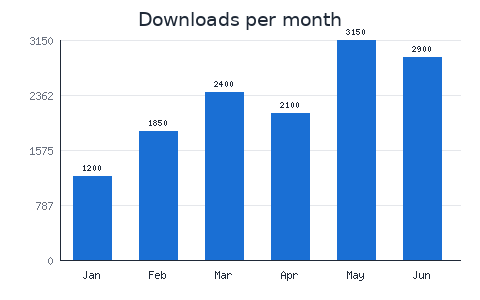
Two particulars matter greater than they appear. Bar heights are rounded, not truncated: (worth * plot_h + max / 2) / max makes June’s 2,900 downloads 203 pixels tall (202.5 rounded up), the place truncation would give 202 and make each bar look barely brief. And gdImageStringFT() returns an error message somewhat than a standing code: NULL means success. It’s known as as soon as with a NULL picture to measure the textual content, which is how the title is centered, and if it fails (no font file, or a LibGD constructed with out FreeType), the chart falls again to the built-in font as a substitute of drawing nothing. On Home windows, C:WindowsFontsarial.ttf works because the font.
Actual-Life Instance: Thumbnails for Uploaded Photos
Any website that accepts picture uploads wants thumbnails. A thumbnail should slot in a field, preserve the picture’s proportions and by no means be enlarged:
void fit_within(int w, int h, int max_side, int *out_w, int *out_h)
{
    if (w <= max_side && h <= max_side) {
        *out_w = w;
        *out_h = h;
        return;
    }
    lengthy lengthy a = w >= h ? w : h, b = w >= h ? h : w;
    int small_side = (int)((b * max_side + a / 2) / a);   /* spherical to nearest */
    if (small_side < 1)
        small_side = 1;
    *out_w = w >= h ? max_side : small_side;
    *out_h = w >= h ? small_side : max_side;
}
gdImagePtr make_thumbnail(gdImagePtr src, int max_side)
{
int tw, th;
fit_within(gdImageSX(src), gdImageSY(src), max_side, &tw, &th);
gdImagePtr dst = gdImageCreateTrueColor(tw, th);
if (dst == NULL)
return NULL;
gdImageAlphaBlending(dst, 0); /* preserve transparency in PNGs */
gdImageSaveAlpha(dst, 1);
gdImageCopyResampled(dst, src, 0, 0, 0, 0, tw, th, gdImageSX(src), gdImageSY(src));
return dst;
}gdImageCopyResampled() averages the supply pixels that fall into every vacation spot pixel, which supplies a clean end result. gdImageCopyResized(), its older sibling, picks one supply pixel for every vacation spot pixel and offers jagged edges. The vacation spot have to be a true-color picture, for the explanations within the earlier part.
Uploads are untrusted enter, so this system checks the file earlier than LibGD decodes it. A PNG file shops its width and peak in its first 24 bytes, and a JPEG in its start-of-frame marker, so image_header() can learn the scale with out decoding any pixels:
/* thumbnail: makes a thumbnail of a PNG or JPEG that matches in a sq. field,
   maintaining the facet ratio, the best way an add handler does.

   utilization: thumbnail IN OUT MAX_SIDE      (OUT ends in .png, .jpg or .jpeg)

   The dimensions is learn from the file header first, so an enormous or malformed
   picture is rejected earlier than LibGD decodes it. */
#embody "imgtools.h"

#embody <stdio.h>
#embody <stdlib.h>

#outline MAX_PIXELS 40000000L                   /* 40 megapixels */

int foremost(int argc, char **argv)
{
    if (argc != 4) {
        fprintf(stderr, "utilization: thumbnail IN OUT MAX_SIDEn");
        return 2;
    }
    int max_side = atoi(argv[3]);
    if (max_side < 1 || max_side > 4096 || format_from_name(argv[2]) == IMG_UNKNOWN) {
        fprintf(stderr, "thumbnail: MAX_SIDE have to be 1-4096 and OUT a .png or .jpg namen");
        return 2;
    }

    img_format fmt;
    int w, h;
    if (image_header(argv[1], &fmt, &w, &h) != 0) {
        fprintf(stderr, "thumbnail: %s isn't a PNG or JPEG filen", argv[1]);
        return 1;
    }
    if ((lengthy)w * h > MAX_PIXELS) {
        fprintf(stderr, "thumbnail: %s is %d x %d, bigger than allowedn", argv[1], w, h);
        return 1;
    }

    gdImagePtr src = gdImageCreateFromFile(argv[1]);
    if (src == NULL) {
        fprintf(stderr, "thumbnail: can not decode %sn", argv[1]);
        return 1;
    }
    gdImagePtr thumb = make_thumbnail(src, max_side);
    int rc = thumb != NULL && save_image(thumb, argv[2], 85) == 0 ? 0 : 1;
    if (rc == 0)
        printf("%s %dxpercentd -> %s %dxpercentdn", argv[1], gdImageSX(src), gdImageSY(src),
               argv[2], gdImageSX(thumb), gdImageSY(thumb));
    else
        fprintf(stderr, "thumbnail: can not write %sn", argv[2]);
    if (thumb != NULL)
        gdImageDestroy(thumb);
    gdImageDestroy(src);
    return rc;
}
Output of thumbnail first.jpg thumb.jpg 100:
first.jpg 320x200 -> thumb.jpg 100x63Output of thumbnail big.png thumb.jpg 100:
thumbnail: assessments/information/big.png is 20000 x 20000, bigger than allowedThe second file is a 33-byte PNG header that claims 20,000 × 20,000 pixels. Decoding it right into a true-color picture would wish 1.6 GB earlier than this system discovered whether or not the remainder of the file even existed. Checking the header first turns that into a right away refusal. The identical test rejects information whose extension lies: a textual content file renamed to picture.png fails the signature test.
Actual-Life Instance: Default Avatars (Identicons)
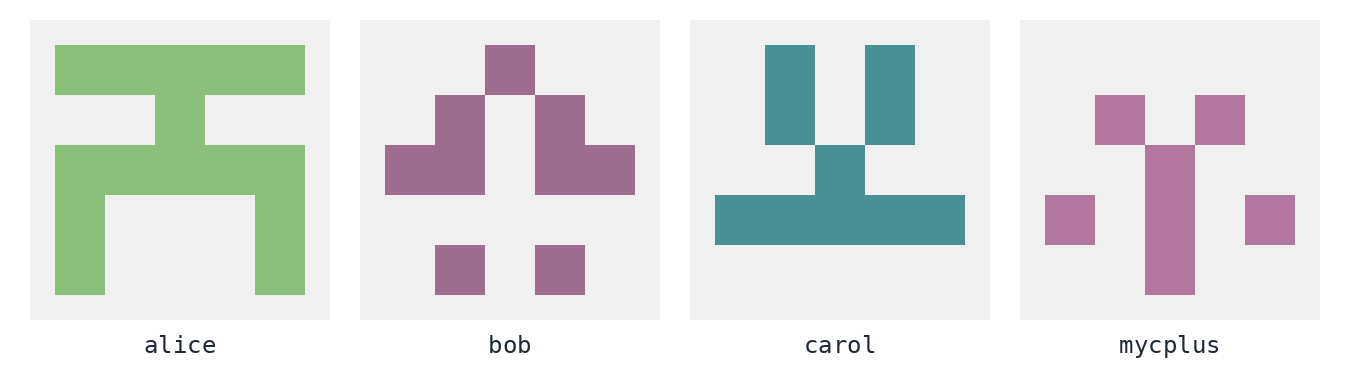
Many websites give a brand new account a generated image till the person uploads one. An identicon is a typical alternative: a hash of the person identify decides which cells of a 5 × 5 grid are crammed and through which shade, and mirroring the left half onto the fitting makes it look designed somewhat than random. The identical identify all the time produces the identical image, so nothing needs to be saved.
uint32_t fnv1a32(const char *s)
{
    uint32_t h = 2166136261u;
    for (; *s != ''; s++) {
        h ^= (unsigned char)*s;
        h *= 16777619u;
    }
    return h;
}
/* Bits 0-14 of the hash fill the left three columns; columns 3 and 4
mirror columns 1 and 0. The colour comes from a second mixture of the hash. */
void identicon_cells(const char *identify, int cells[5][5], int *r, int *g, int *b)
{
uint32_t h = fnv1a32(identify);
for (int row = 0; row < 5; row++)
for (int col = 0; col < 3; col++) {
int on = (int)(h >> (row * 3 + col) & 1u);
cells[row][col] = on;
cells[row][4 - col] = on;
}
uint32_t c = h * 2654435761u;
*r = 40 + (int)(c >> 24 & 0xFF) % 160;
*g = 40 + (int)(c >> 16 & 0xFF) % 160;
*b = 40 + (int)(c >> 8 & 0xFF) % 160;
}/* identicon: attracts a default avatar from a person identify, the best way websites give
new accounts an image. The identical identify all the time provides the identical picture.
utilization: identicon NAME OUT.png */
#embody "imgtools.h"
#embody <stdio.h>
int foremost(int argc, char **argv)
{
if (argc != 3) {
fprintf(stderr, "utilization: identicon NAME OUT.pngn");
return 2;
}
int cells[5][5], r, g, b;
identicon_cells(argv[1], cells, &r, &g, &b);
printf("%s: hash %08lx, shade #%02Xpercent02Xpercent02Xn", argv[1],
(unsigned lengthy)fnv1a32(argv[1]), r, g, b);
for (int row = 0; row < 5; row++) { /* the identical grid, as textual content */
for (int col = 0; col < 5; col++)
putchar(cells[row][col] ? '#' : '.');
putchar('n');
}
gdImagePtr im = draw_identicon(argv[1], 50);
if (im == NULL || save_image(im, argv[2], -1) != 0) {
fprintf(stderr, "identicon: can not write %sn", argv[2]);
if (im != NULL)
gdImageDestroy(im);
return 1;
}
gdImageDestroy(im);
return 0;
}Output of identicon alice alice.png:
alice: hash 872213e7, shade #8AC079
#####
..#..
#####
#...#
#...#
The hash is 32-bit FNV-1a, which is quick and spreads comparable names effectively; the assessments test it in opposition to the printed check vectors. It’s not a cryptographic hash, which is okay for avatars and fallacious for something that should not be guessed.
Sending an Picture With out Writing a File
An internet server or a CGI program normally sends the picture within the response as a substitute of saving it. gdImagePngPtr() and gdImageJpegPtr() encode the picture right into a reminiscence buffer and return its measurement. The buffer belongs to you, and LibGD allotted it, so it have to be launched with gdFree(), not with free() and never with gdImageDestroy():
int foremost(int argc, char **argv)
{
    int leak = argc > 1 && strcmp(argv[1], "leak") == 0;
    gdImagePtr im = gdImageCreateTrueColor(100, 100);
    if (im == NULL)
        return 1;
    gdImageFilledRectangle(im, 0, 0, 99, 99, gdTrueColor(0x46, 0x7F, 0x40));

    int measurement = 0;
    void *png = gdImagePngPtr(im, &measurement);      /* the PNG file, in reminiscence */
    gdImageDestroy(im);
    if (png == NULL)
        return 1;
    /* ... right here a server would ship the scale bytes at png to the consumer ... */
    printf("encoded a PNG in memorypercentsn", leak ? " (buffer not freed)" : " and freed it");
    if (!leak)
        gdFree(png);
    return 0;
}
Mistake 3 beneath exhibits what occurs when the gdFree() name is lacking.
Frequent Errors with LibGD
Every mistake beneath is a small program within the repository’s pitfalls listing, and the output is that program’s actual output. Sanitizer reviews are summarized to the error and the supply line.
1. Opening the picture file in textual content mode
Each PNG file begins with the identical eight bytes: 89 50 4E 47 0D 0A 1A 0A. The PNG specification’s rationale explains why: the carriage return and line feed (0D 0A) and the lone line feed (0A) are there so {that a} file broken by newline conversion, in both course, is detected without delay. Opening the output file with fopen(path, "w") is precisely such a switch on Home windows: in textual content mode, the C library writes each 0A byte as 0D 0A. On Linux and macOS, textual content mode and binary mode are the identical factor, so the bug by no means exhibits up there.
This program writes the identical picture twice, as soon as with "wb" and as soon as with "w", and prints every file’s first eight bytes and whether or not LibGD can learn it again:
/* Pitfall: opening a picture file in textual content mode. A PNG file begins with the
   bytes 89 50 4E 47 0D 0A 1A 0A. Its designers put a CR LF and an LF in
   that signature on goal, so {that a} text-mode switch damages it
   visibly. With fopen(..., "w") on Home windows, each 0A byte written turns into
   0D 0A, and the file is not a PNG. On Linux and macOS "w" and "wb"
   are the identical, so code with this bug works there and fails on Home windows. */
#embody <gd.h>
#embody <stdio.h>

static void try_mode(const char *mode)
{
    const char *path = "mode-test.png";
    gdImagePtr im = gdImageCreateTrueColor(64, 64);
    if (im == NULL)
        return;
    gdImageFilledRectangle(im, 0, 0, 63, 63, gdTrueColor(0x1A, 0x6F, 0xD4));
    FILE *out = fopen(path, mode);
    if (out == NULL) {
        gdImageDestroy(im);
        return;
    }
    gdImagePng(im, out);
    fclose(out);
    gdImageDestroy(im);

    unsigned char sig[8] = {0};
    FILE *in = fopen(path, "rb");
    size_t bought = in != NULL ? fread(sig, 1, sizeof sig, in) : 0;
    if (in != NULL)
        fclose(in);
    printf("fopen mode "%s":%s first bytes", mode, mode[1] == '' ? " " : "");
    for (size_t i = 0; i < bought; i++)
        printf(" %02X", sig[i]);

    gdImagePtr again = gdImageCreateFromFile(path);
    printf("n  learn again: %sn", again != NULL ? "a sound 64x64 PNG" : "not a sound PNG");
    if (again != NULL)
        gdImageDestroy(again);
    take away(path);
}

int foremost(void)
{
    try_mode("wb");
    try_mode("w");
    return 0;
}
Output on Ubuntu 24.04:
fopen mode "wb": first bytes 89 50 4E 47 0D 0A 1A 0A
  learn again: a sound 64x64 PNG
fopen mode "w":  first bytes 89 50 4E 47 0D 0A 1A 0A
  learn again: a sound 64x64 PNG
Output on Home windows 11 (MSVC):
fopen mode "wb": first bytes 89 50 4E 47 0D 0A 1A 0A
  learn again: a sound 64x64 PNG
fopen mode "w":  first bytes 89 50 4E 47 0D 0D 0A 1A
  learn again: not a sound PNG
On Linux the 2 information are equivalent. On Home windows the "w" file has an additional 0D within the signature: the road feed at byte 6 was written as a carriage return and line feed, each later byte moved one place, and LibGD refused the file. The identical growth occurs to each 0A byte within the compressed picture information after it, so the harm isn’t restricted to the header. The repository’s Home windows check expects precisely this output.
The repair is one character, and it belongs in each fopen() name for picture information: "wb" to write down and "rb" to learn. Code that’s solely ever examined on Linux is not going to catch it, which is why this text’s assessments additionally run on Home windows.
2. Utilizing a picture with out checking that it loaded
gdImageCreateFromFile() and the format-specific load features return NULL for a lacking, truncated or corrupt file. LibGD additionally prints a warning to straightforward error, which is straightforward to overlook in a server log. Code that goes on to name gdImageSX(im) reads via a null pointer:
int foremost(int argc, char **argv)
{
    if (argc < 2)
        return 2;
    gdImagePtr im = gdImageCreateFromFile(argv[1]);
    if (argc > 2 && strcmp(argv[2], "unchecked") == 0) {
        printf("measurement: %d x %dn", gdImageSX(im), gdImageSY(im));   /* crashes if im is NULL */
        return 0;
    }
    if (im == NULL) {
        printf("can not load the file as an imagen");
        return 1;
    }
    printf("measurement: %d x %dn", gdImageSX(im), gdImageSY(im));
    gdImageDestroy(im);
    return 0;
}
Given the truncated PNG from the thumbnail instance, the checked path reviews the issue and exits with standing 1:
Output of unchecked_load big.png:
GD Warning: gd-png: deadly libpng error: Learn Error: truncated information
GD Warning: gd-png error: setjmp returns error situation 1
can not load the file as a picture
The unchecked path crashes with a segmentation fault. Constructed with UndefinedBehaviorSanitizer, the report names the road:
GD Warning: gd-png: deadly libpng error: Learn Error: truncated information
unchecked_load.c:16:9: runtime error: member entry inside null pointer of sort 'struct gdImage'
3. Leaking the buffer from gdImagePngPtr()
With out the gdFree() name, each picture the server sends leaks its entire encoded measurement. AddressSanitizer’s leak checker reviews it at exit (summarized):
Direct leak of 313 byte(s) in 1 object(s), allotted at png_buffer_leak.c:20 (gdImagePngPtr)313 bytes is the scale of that small inexperienced PNG. For an actual chart or picture the leak is tens or a whole bunch of kilobytes per request, which is how a long-running picture server runs out of reminiscence.
4. Drawing pictures and gradients in a palette picture
A palette picture holds 256 colours, because the palette part above confirmed: resampling a gradient into one stored 256 of its colours the place a true-color picture stored 16,384. The identical restrict makes antialiased traces and JPEG pictures look posterized. Create the picture with gdImageCreateTrueColor(), and in the event you load a palette PNG and need to draw easily on it, convert it with gdImagePaletteToTrueColor() first.
5. Decoding untrusted photos with out limits
A picture file says how large it’s, and a decoder allocates what it says. Test the size from the header earlier than decoding, because the thumbnail program does, and set a restrict that fits your software. Additionally preserve LibGD and the libraries beneath it (libpng, libjpeg, zlib) up to date via your package deal supervisor: the challenge’s personal launch notes listing safety fixes in 2.2.x and a pair of.3.0, and picture parsers are a typical goal as a result of they learn information from strangers.
LibGD In contrast with Different C Picture Libraries
LibGD isn’t the one alternative, and for some jobs it’s not the most effective one:
| Library | Greatest for | Notes |
|---|---|---|
| LibGD | Producing charts, thumbnails and easy graphics; code that mirrors PHP’s GD features | Small C API; many codecs via elective libraries; no new launch since 2021 |
| stb_image and stb_image_write | Loading and saving photos with no dependencies | Single header information you copy right into a challenge; no drawing features |
| Cairo | Excessive-quality vector drawing: antialiased shapes, textual content, PDF and SVG output | The higher alternative for polished charts |
| libvips | Resizing and changing massive photos quick, with little reminiscence | Streams photos as a substitute of loading them entire; the higher alternative for a busy thumbnail service |
| ImageMagick (MagickWand) | Format conversion and results throughout a really big selection of codecs | Massive dependency; configure its safety coverage for untrusted enter |
For the roles on this article, LibGD is sufficient, and its small API makes it a great way to learn the way picture era works.
How the Code Is Examined
Picture code is difficult to test by eye, so the assessments learn the photographs again:
- Unit assessments (6,779 checks) cowl format detection from file names and headers, PNG and JPEG headers learn with out decoding, truncated and pretend information, lossless PNG spherical journeys, the thumbnail measurement for dozens of shapes (together with rounding and skinny photos), FNV-1a in opposition to its printed check vectors, the mirroring and colours of identicons, and each bar of the chart: its high and backside rows, its width, and that precisely six bars exist.
- The applications’ information are learn again by
imgcheck, which checks the format, measurement and chosen pixel colours of each picture the applications write. - The pitfall applications should print precisely the output proven right here, together with the Home windows-only results of mistake 1.
- Deliberate errors.
assessments/mutations.pyplaces twelve believable bugs into the helper library one by one and confirms that the unit assessments fail for every:
| Deliberate mistake | Test that failed |
|---|---|
| thumbnail measurement truncated, not rounded | w == instances[i][3] && h == instances[i][4] |
| small photos enlarged to the field | w == instances[i][3] && h == instances[i][4] |
| skinny photos get a zero-pixel aspect | w == instances[i][3] && h == instances[i][4] |
| PNG header width and peak swapped | image_header("t-image.png", &f, &w, &h) == 0 && f == IMG_PNG && w == 37 && h == 23 |
| JPEG header width and peak swapped | image_header("t-image.jpg", &f, &w, &h) == 0 && f == IMG_JPEG && w == 37 && h == 23 |
| fallacious FNV prime | fnv1a32("a") == 0xe40c292cu |
| identicon mirrored onto the fallacious column | memcmp(cells, once more, sizeof cells) == 0 && r == r2 && g == g2 && b == b2 |
| identicon reads the fallacious hash bits | cells[row][col] == (int)(h >> (row * 3 + src) & 1u) |
| bar heights truncated, not rounded | bar_height_px(2900, 3150, 220) == 203 |
| bars one pixel too tall | !is_rgb(im, cx, base - bh - 1, CHART_BAR_COLOR) |
| bars one pixel too vast | !is_rgb(im, bx - 1, base - 1, CHART_BAR_COLOR) && !is_rgb(im, bx + bw, base - 1, CHART_BAR_COLOR) |
| unknown extension saved as JPEG | save_image(im, "t-image.gif", -1) == -1 |
Key Takeaways
- LibGD creates PNG, JPEG and different photos from C: create a picture, draw, save with
gdImagePng()orgdImageJpeg(), then free it withgdImageDestroy(). - Use true-color photos (
gdImageCreateTrueColor()); a palette picture holds solely 256 colours. - At all times open picture information with
"wb". On Home windows,"w"corrupts the PNG signature. - Test each create and cargo name for
NULL, and free buffers fromgdImagePngPtr()withgdFree(). - Resize with
gdImageCopyResampled()right into a true-color picture, preserve the facet ratio, and around the sizes. - Deal with uploaded photos as untrusted: learn the scale from the header and reject outsized information earlier than decoding them.
gdImageStringFT()returns an error string,NULLon success; fall again to a built-in font when it fails.
Conclusion
Many of the work in picture era isn’t the drawing. It’s the choices round it: which type of picture to create, measurement it, write it in order that it survives on each system, and refuse a file that may exhaust reminiscence. LibGD retains the drawing half small, which leaves these choices in plain sight in a couple of dozen traces of C.
From right here, attempt sending a chart straight from a small internet server with gdImagePngPtr(), or add antialiased traces with gdImageSetAntiAliased(). For extra C programming, see the C programming part.
Supply Code and Checks

All applications on this web page are within the graphics/libgd listing of the MYCPLUS C examples repository.
Construct, check and run (Linux and macOS; on Home windows add -DCMAKE_TOOLCHAIN_FILE=<vcpkg>/scripts/buildsystems/vcpkg.cmake to the primary command):
cmake -S . -B construct
cmake --build construct
ctest --test-dir construct --output-on-failure
cd construct && ./chart ../information/downloads.txt chart.png
What the construct checks.
- Compilers: GCC and Clang beneath C11 and C17 with
-Wall -Wextra -pedantic -Werroron Linux, and MSVC beneath/W4 /WXwith LibGD from vcpkg on Home windows. - Photos: each picture the applications write is learn again and its format, measurement and pixels checked.
- Sanitizers and mutations: the assessments run clear beneath AddressSanitizer and UndefinedBehaviorSanitizer, the leak and the null-pointer pitfalls are reported, and all twelve deliberate errors are caught.
What I Verified
The Ubuntu column was run for this text on Ubuntu 24.04 (x86-64, GCC 13.3, Clang 18, CMake 3.28, LibGD 2.3.3 from Ubuntu, Valgrind). The Home windows column comes from the repository’s run_all.ps1 on Home windows 11 (MSVC 19.44 with CMake 4.4, and LibGD 2.3.3 from vcpkg with PNG, JPEG and FreeType).
| Test | Ubuntu 24.04 | Home windows 11 |
|---|---|---|
Builds with warnings as errors: GCC and Clang (C11 and C17) on Ubuntu, MSVC /W4 /WX (C11 and C17) on Home windows |
Handed | MSVC /W4 /WX, C11 and C17: constructed |
| CTest: unit assessments, photos learn again, program outputs, TrueType title | 20 of 20 in all 4 configurations | 20 of 20 in C11 and in C17 |
| Unit-test checks | 6,779 handed | 6,779 handed |
"w" versus "wb" (mistake 1) |
Each information legitimate | "w" file rejected, signature 89 50 4E 47 0D 0D 0A 1A |
| Palette limits (256 colours; 16,384 in opposition to 256 after resampling) | Similar numbers | Similar numbers |
| AddressSanitizer and UndefinedBehaviorSanitizer, each check | 20 of 20, clear | Not relevant |
The leaked PNG buffer and the unchecked NULL picture are reported |
Sure (LeakSanitizer, UBSan) | Not relevant |
Valgrind memcheck: unit assessments, chart, thumbnail |
No errors, no leaks | Not relevant |
| 12 deliberate errors injected into the helper library | 12 of 12 caught | Not run |
Not coated: macOS, LibGD variations apart from 2.3.3, 32-bit builds, and codecs apart from PNG and JPEG (GIF, WebP, AVIF and TIFF weren’t examined).

