


Reviewed by: Sumit Sarabhai and Gaurav Sharma
If you happen to’ve labored with databases in Python, you recognize the boilerplate: open a connection, create a cursor, run queries, commit or rollback transactions, shut cursors and connection. Forgetting only one cleanup step can result in useful resource leaks (open connections) and even inconsistent knowledge. That’s the place context managers step in.
We’ve launched context supervisor help in mssql‑python driver, enabling Python functions to work together with SQL Server and Azure SQL extra safely, cleanly, and in a really Pythonic means.
Attempt it right here
You’ll be able to set up driver utilizing
Calling all Python + SQL builders! We invite the group to check out mssql-python and assist us form the way forward for high-performance .!
Why Context Managers?
In Python, the with assertion is syntactic sugar for useful resource administration. It actively units up assets once you enter a block and mechanically cleans them up once you exit — even when an exception is raised.
Consider it as hiring a helper:
- They put together the workspace earlier than you start.
- They pack all the things up once you’re carried out.
- If one thing breaks halfway, they deal with the cleanup for you.
The Downside: Managing Connections and Cursors
Earlier, working with Python functions and SQL server/Azure SQL appeared one thing like this:
from mssql_python import join

conn = join(connection_string)
cursor = conn.cursor()

strive:
    cursor.execute("SELECT * FROM customers")
    for row in cursor:
        print(row)
lastly:
    cursor.shut()
    conn.shut()
This works completely tremendous. However think about in case your code had a number of cursors, a number of queries, and exception dealing with sprinkled throughout. Closing each connection and cursor manually turns into tedious and error-prone. Miss a shut() someplace, and you’ve got a useful resource leak.
That’s the place Python’s with assertion — the context supervisor — involves the rescue. mssql_python not solely helps it for connections but in addition for cursors, which makes useful resource administration practically easy.
Utilizing Context Managers with Connections
Now comes the true magic — connection-level context managers. Once you wrap a connection in a with block, a number of issues occur below the hood:
- If all the things succeeds, the transaction is dedicated.
- If an exception happens, the transaction is rolled again.
- The connection is at all times closed when leaving the block.
Instance:
from mssql_python import join

with join(connection_string) as conn:
    cursor = conn.cursor()
    cursor.execute("INSERT INTO customers (identify) VALUES ('Alice')")
    # If no exception → commit occurs mechanically
    # If exception → rollback occurs mechanically
# Connection is closed mechanically right here
Equal conventional strategy:
conn = join(connection_string)
strive:
    cursor = conn.cursor()
    cursor.execute("INSERT INTO customers (identify) VALUES ('Alice')")
    if not conn.autocommit:
        conn.commit()
besides:
    if not conn.autocommit:
        conn.rollback()
    elevate
lastly:
    conn.shut()
How It Works Internally
- Getting into the block
- Connection is opened and assigned to conn.
- All operations contained in the block run utilizing this connection.
- Exiting the block
- No exception: If
autocommit=False, transactions are dedicated. - Exception raised: If
autocommit=False, uncommitted modifications are rolled again. The exception propagates except dealt with.
- No exception: If
- Cleanup: Connection is at all times closed, stopping useful resource leaks.
Use case: Excellent for transactional code — inserts, updates, deletes — the place you need automated commit/rollback.
Utilizing Context Managers with Cursors
Cursors in mssql_python now help the with assertion. The context right here is tied to the cursor useful resource, not the transaction.
with conn.cursor() as cursor:
    cursor.execute("SELECT * FROM customers")
    for row in cursor:
        print(row)
# Cursor is mechanically closed right here
What occurs right here?
- Getting into the block: A brand new cursor is created.
- Contained in the block: All SQL statements execute utilizing this cursor.
- Exiting the block: The cursor is mechanically closed — no must name
cursor.shut()manually. - Transactions: The cursor itself doesn’t handle transactions. Commit/rollback is managed by the connection.
- If
autocommit=False, modifications are dedicated or rolled again on the connection stage. - If
autocommit=True, every assertion is dedicated instantly because it executes.
- If
Above code is equal to the standard try-finally strategy:
cursor = conn.cursor()
strive:
    cursor.execute("SELECT * FROM customers")
    for row in cursor:
        print(row)
lastly:
    cursor.shut()
Use case: Greatest for read-only queries the place you don’t need to fear about cursor leaks.
Essential
If you happen to simply need to make sure the cursor closes correctly with out worrying about transactions, that is the only and most secure strategy.
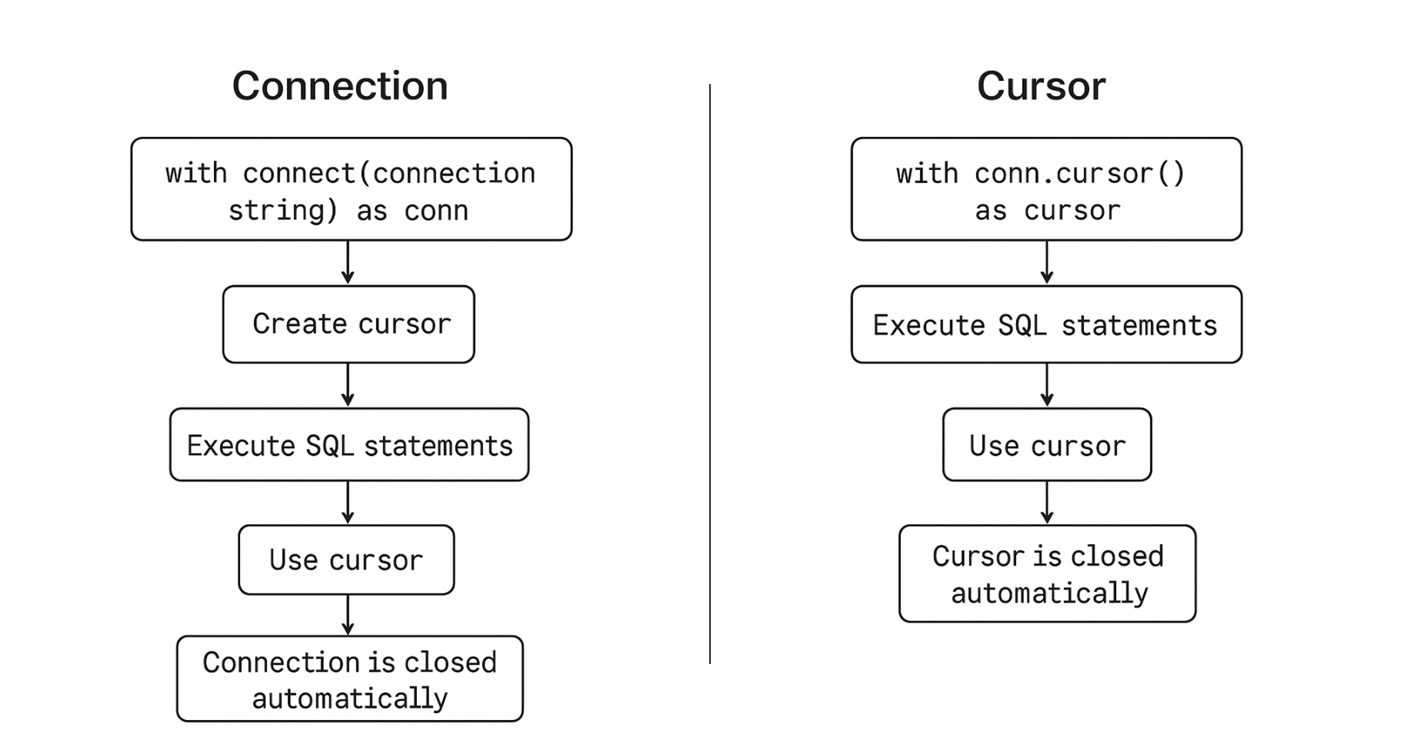
Picture 1: Workflow of Context Supervisor in Connections and Cursor
Sensible Examples
Instance 1: Secure SELECT Queries
with join(connection_string) as conn:
    with conn.cursor() as cursor:
        cursor.execute("SELECT * FROM customers WHERE age > 25")
        for row in cursor:
            print(row)
    # Cursor closed, connection nonetheless open till block ends
# Connection is closed
Instance 2: A number of Operations in One Transaction
with join(connection_string) as conn:
    with conn.cursor() as cursor:
        cursor.execute("INSERT INTO customers (identify) VALUES ('Bob')")
        cursor.execute("UPDATE customers SET age = age + 1 WHERE identify="Alice"")
# Every thing dedicated mechanically if no exception
Instance 3: Dealing with Exceptions Routinely
strive:
    with join(connection_string) as conn:
        with conn.cursor() as cursor:
            cursor.execute("INSERT INTO customers (identify) VALUES ('Charlie')")
            # Simulate error
            elevate ValueError("Oops, one thing went improper")
besides ValueError as e:
    print("Transaction rolled again attributable to:", e)
# Connection closed mechanically, rollback executed
Actual-Life Eventualities
Instance 1: Net Functions
In an internet app the place every request inserts or fetches knowledge:
def add_user(identify):
    with join(connection_string) as conn:
        with conn.cursor() as cursor:
cursor.execute("INSERT INTO customers (identify) VALUES (?)", (identify,))- Ensures commit/rollback mechanically.
- No open connections piling up.
- Clear, readable, and protected code for high-traffic eventualities.
Instance 2: Knowledge Migration / ETL
Migrating knowledge between tables:
with join(connection_string) as conn:
    with conn.cursor() as cursor:
        cursor.execute("INSERT INTO archive_users SELECT * FROM customers WHERE inactive=1")
cursor.execute("DELETE FROM customers WHERE inactive=1")- If any assertion fails, rollback occurs mechanically.
- Prevents partial migration, conserving knowledge constant.
Instance 3: Automated Reporting
Working a number of queries for analytics:
with join(connection_string) as conn:
    with conn.cursor() as cursor:
        cursor.execute("SELECT COUNT(*) FROM customers")
        user_count = cursor.fetchone()[0]
        cursor.execute("SELECT division, COUNT(*) FROM staff GROUP BY division")
        for row in cursor:
print(row)- Cursors closed mechanically after every block.
- Makes scripts modular and maintainable.
Instance 4: Monetary Transactions
Easy financial institution switch instance:
def transfer_funds(from_account, to_account, quantity):
    with join(connection_string) as conn:
        with conn.cursor() as cursor:
            cursor.execute("UPDATE accounts SET stability = stability - ? WHERE id=?", (quantity, from_account))
cursor.execute("UPDATE accounts SET stability = stability + ? WHERE id=?", (quantity, to_account))- Automated rollback on failure ensures cash isn’t misplaced or double-counted.
- Eliminates verbose error-handling boilerplate.
Instance 5: Advert-Hoc Knowledge Exploration
When exploring knowledge in scripts or notebooks:
with join(connection_string) as conn:
    with conn.cursor() as cursor:
        cursor.execute("SELECT AVG(wage) FROM staff")
print("Common wage:", cursor.fetchone()[0])- Excellent for fast queries.
- No forgotten
shut()calls. - Encourages clear, reusable question blocks.
Takeaway
Python’s philosophy is “easy is best than complicated.” With context managers in mssql_python, we’ve introduced that simplicity to SQL Server interactions with python apps making lives of the builders simpler.
Subsequent time you’re working with mssql_python, strive wrapping your connections and cursors with with. You’ll write much less code, make fewer errors, and your future self will thanks. Whether or not it’s a high traffic net utility, an ETL script, or exploratory evaluation, context managers simplify life, make code safer, and cut back errors.
Keep in mind, context supervisor will show you how to with:
- Much less boilerplate code: Not try-finally for cursors or connections.
- Automated transaction administration: Commit or rollback is dealt with based mostly on success or failure.
- Secure useful resource cleanup: Prevents useful resource leaks with automated closing.
- Readable and Pythonic: Nested with blocks clearly present the scope of cursor and connection utilization.
Attempt It and Share Your Suggestions!
We invite you to:
- Verify-out the motive force and combine it into your tasks.
- Share your ideas: Open , counsel options, and contribute to the venture.
- Be a part of the dialog: | .
Use Python Driver with Free Azure SQL Database
You should use the Python Driver with the free model of Azure SQL Database!
✅
✅ Excellent for testing, growth, or studying eventualities with out incurring prices.

