



Image this: you want an agent that researches a subject, calls an API with the findings, then palms off to a specialist that codecs the outcome. Three steps, three distinct jobs, one workflow. Cease imagining brokers as single-shot Q&A bots. With the OpenAI Brokers SDK, you’re constructing programs that chain analysis, instrument execution, and delegation into working pipelines.
This tutorial walks you thru a multi-step agent workflow utilizing the OpenAI Brokers SDK for Python. You’ll construct a analysis agent that gathers info, a tool-calling agent that processes that information, and a specialist agent that handles the ultimate output. You’ll wire them along with handoffs, validate every step, and examine the tracing output so you’ll be able to see precisely what the SDK executed at every flip.
Conditions
If you wish to comply with alongside hands-on, you’ll want:
-
Python 3.11 or increased: The SDK requires Python 3.11+. Test your model with
python3 --version. -
OpenAI API key: The SDK calls OpenAI’s fashions. Get your API key from platform.openai.com/api-keys. Set it as
OPENAI_API_KEYin your surroundings or.envfile. With out this, the agent loop fails to start out. -
openai-agents bundle: Set up with
pip set up openai-agents. You’ll additionally wantpython-dotenvin the event you’re utilizing.envfor secrets and techniques:pip set up python-dotenv. -
Primary Python familiarity: You have to be snug studying features, courses, and async syntax. The SDK makes use of
async defandawaitall through.
Understanding the Multi-Step Agent Sample
Earlier than you write code, perceive what you’re constructing. A multi-step agent workflow chains a number of brokers, every with a particular job. The primary agent researches. The second agent calls a instrument with the analysis outcomes. The third agent codecs the output. Every agent palms off to the following when its job is finished.
This sample solves an issue single-agent loops can’t: clear separation of considerations. When one agent does every little thing (analysis, API calls, formatting, error dealing with), it turns into a hairball of conditionals and retry logic. While you cut up the workflow into specialised brokers, every agent has one job, one instruction set, and one failure mode to deal with. The SDK manages the handoff protocol, the execution loop, and the hint logging. You write the directions and outline the instruments.
The SDK launched handoffs in model 0.6.0 and has been refining the sample by way of 0.26.0 (the present model as of November 2026). Based on the SDK launch notes, “Handoffs allow brokers to delegate particular duties to different brokers, sustaining context and enabling advanced multi-agent workflows.”
Professional Tip: Handoffs aren’t the identical as calling one other agent as a instrument. While you name an agent as a instrument, the mum or dad agent stays within the driver’s seat and processes the instrument outcome. While you use a handoff, the mum or dad agent exits and the kid agent takes over the dialog. The SDK’s handoff() perform transfers management, not simply information.
Setting Up Your Mission
Create a brand new listing and arrange your surroundings. Based on the OpenAI Brokers SDK set up information, the bundle requires Python 3.11 or increased and may be put in with pip:
mkdir multi-step-agent
cd multi-step-agent
python3 -m venv venv
supply venv/bin/activate  # On Home windows: venvScriptsactivate
pip set up openai-brokers python-dotenv
This creates a digital surroundings and installs the SDK. The python-dotenv bundle masses surroundings variables from a .env file, which retains your API key out of supply management.
Create a .env file in your mission root:
OPENAI_API_KEY=sk-your-actual-api-key-hereSubstitute sk-your-actual-api-key-here together with your actual OpenAI API key. The SDK reads this variable mechanically whenever you run your script.
Confirm the SDK put in accurately:
python3 -c "import openai_agents; print(openai_agents.__version__)"You must see a model string like 0.26.0. In the event you get ModuleNotFoundError, the SDK didn’t set up. Run pip set up openai-agents once more and verify for errors.
Constructing a Multi-Step Agent Pipeline
You’ll construct three specialised brokers, every with one job. The primary researches, the second analyzes with instruments, and the third codecs the output. Every agent palms off to the following when its work is full.
The Analysis Agent
The primary agent in your workflow gathers info. This agent receives a subject, generates a analysis abstract, and palms off to the following agent. It doesn’t name instruments and it doesn’t format output. It researches.
Create a file referred to as research_agent.py:
from openai_agents import Agent

research_agent = Agent(
    title="ResearchAgent",
    directions=(
        "You're a analysis specialist. When given a subject, present a concise "
        "abstract of key details, statistics, and up to date developments. Format your "
        "analysis as a bulleted listing with 3-5 key factors. Be particular and cite "
        "numbers when doable."
    ),
    mannequin="gpt-4.5-turbo",
)
This agent has no instruments, no handoffs, and no output constraints. It runs on GPT-4.5 Turbo, which balances velocity and high quality for analysis duties. The directions discipline tells the agent what to do. The SDK injects these directions as a system message when the agent loop begins.
The mannequin choice issues. Based on the OpenAI Brokers SDK documentation, “The default mannequin is gpt-4, however you’ll be able to override this per agent utilizing the mannequin parameter. For analysis duties, we advocate gpt-4.5-turbo for its improved reasoning and velocity.”
Warning: By no means put your OpenAI API key instantly in your Python code. All the time load it from surroundings variables or a .env file. In the event you commit a key to model management, it turns into public and also you’ll burn by way of your utilization limits earlier than you discover.
The Software-Calling Agent
The second agent processes the analysis. This agent calls a customized Python perform that simulates an API request. In an actual workflow, this would possibly hit a database, question a third-party API, or run a calculation. Right here, you’ll construct a easy instrument that counts phrases within the analysis abstract and returns a formatted outcome.
Outline the instrument first. The SDK’s perform instruments documentation expects instruments to be Python features adorned with @instrument:
from openai_agents import Agent, instrument

@instrument
def analyze_research(research_text: str) -> dict:
    """
    Analyze analysis textual content and return phrase rely and key statistics.

    Args:
        research_text: The analysis abstract to investigate

    Returns:
        A dictionary with word_count and sentence_count
    """
    phrases = research_text.cut up()
    sentences = research_text.cut up('.')

    return {
        "word_count": len(phrases),
        "sentence_count": len(sentences),
        "avg_words_per_sentence": spherical(len(phrases) / max(len(sentences), 1), 2)
    }

analysis_agent = Agent(
    title="AnalysisAgent",
    directions=(
        "You analyze analysis summaries. Name the analyze_research instrument with the "
        "analysis textual content you obtain. Report the phrase rely, sentence rely, and "
        "common phrases per sentence."
    ),
    mannequin="gpt-4.5-turbo",
    instruments=[analyze_research],
)
The @instrument decorator tells the SDK that this perform is callable by an agent. The docstring is essential: the SDK sends it to the mannequin because the instrument’s description, so the mannequin is aware of when to name it. In case your docstring is obscure or lacking, the mannequin won’t name the instrument reliably.
The instruments parameter wires the perform to the agent. When the agent loop runs and the mannequin decides to name analyze_research, the SDK executes your Python perform, captures the return worth, and feeds it again into the dialog as a instrument outcome.
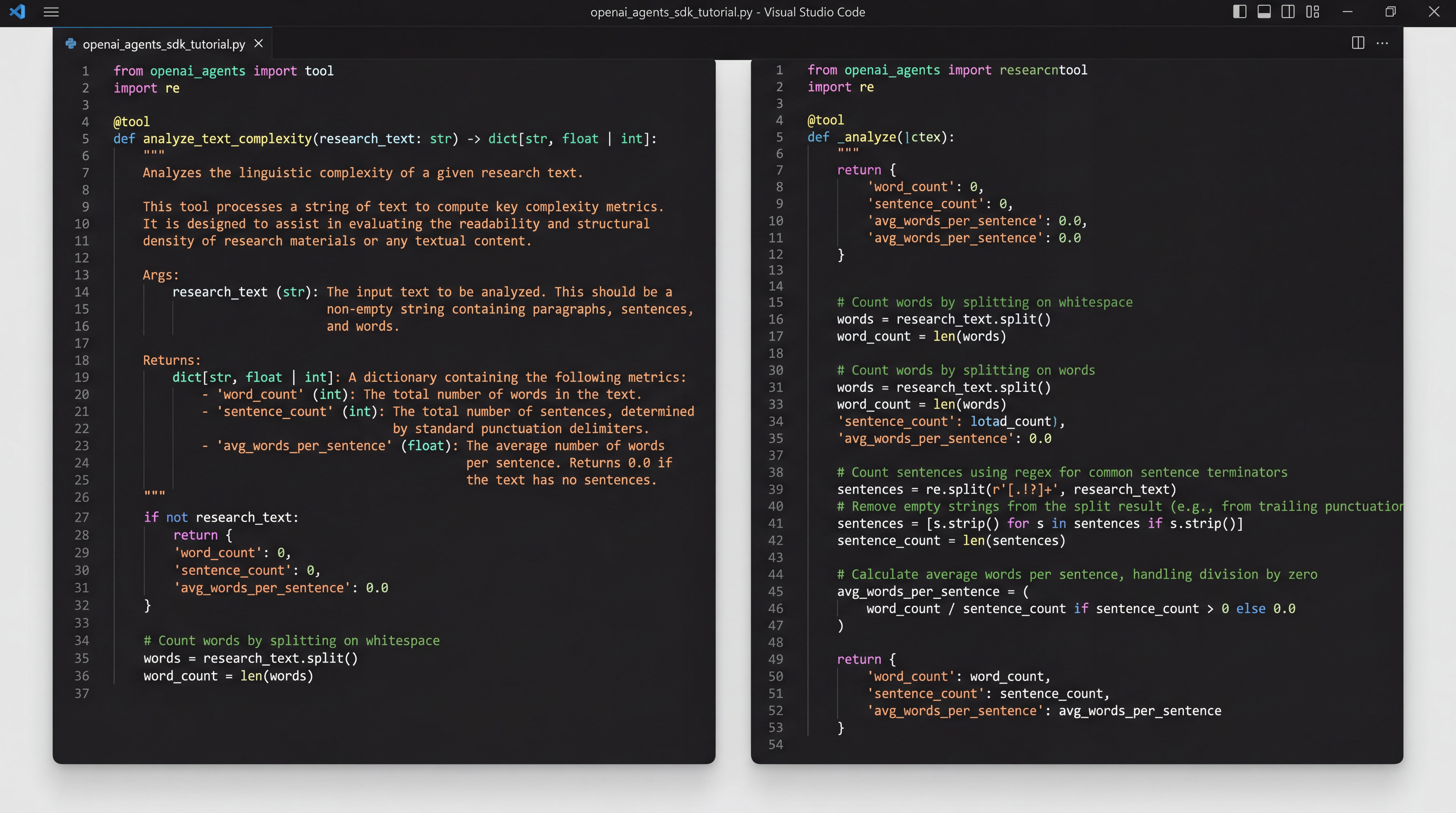
Key Perception: Software docstrings aren’t only for people. The SDK sends your docstring to the mannequin because the instrument’s description. A obscure docstring like “Analyzes textual content” produces unreliable instrument calls. A particular docstring like “Analyze analysis textual content and return phrase rely and key statistics” tells the mannequin precisely when to invoke the instrument.
The Formatting Agent
The third agent codecs the ultimate output. This agent receives the evaluation outcomes and produces a human-readable abstract. It doesn’t name instruments and it doesn’t analysis. It codecs.
formatter_agent = Agent(
    title="FormatterAgent",
    directions=(
        "You're a formatting specialist. Take the evaluation outcomes and format "
        "them into a transparent, skilled abstract. Use full sentences and "
        "spotlight an important statistics."
    ),
    mannequin="gpt-4.5-turbo",
)
Similar sample because the analysis agent: directions, mannequin, no instruments. The job is slim, so the directions are slim.
Wiring the Brokers with Handoffs
Now join the brokers. The SDK’s multi-agent patterns documentation describes handoffs because the mechanism for transferring management between brokers. Replace your research_agent at hand off to the evaluation agent:
from openai_agents import Agent, handoff

research_agent = Agent(
    title="ResearchAgent",
    directions=(
        "You're a analysis specialist. When given a subject, present a concise "
        "abstract of key details, statistics, and up to date developments. Format your "
        "analysis as a bulleted listing with 3-5 key factors. Be particular and cite "
        "numbers when doable. After finishing your analysis, hand off to the "
        "AnalysisAgent."
    ),
    mannequin="gpt-4.5-turbo",
    handoffs=[
        handoff(
            agent=analysis_agent,
            condition="After completing research summary"
        )
    ],
)
The handoffs parameter takes an inventory of handoff() objects. Every handoff specifies the goal agent and an optionally available situation string. The SDK interprets the situation as pure language steering for when to set off the handoff. When the mannequin’s reasoning matches the situation, the SDK transfers management to the goal agent.
Wire the evaluation agent to the formatter agent:
analysis_agent = Agent(
    title="AnalysisAgent",
    directions=(
        "You analyze analysis summaries. Name the analyze_research instrument with the "
        "analysis textual content you obtain. Report the phrase rely, sentence rely, and "
        "common phrases per sentence. After reporting the evaluation, hand off to the "
        "FormatterAgent."
    ),
    mannequin="gpt-4.5-turbo",
    instruments=[analyze_research],
    handoffs=[
        handoff(
            agent=formatter_agent,
            condition="After reporting analysis results"
        )
    ],
)
The formatter agent wants no handoffs as a result of it’s the ultimate agent within the chain. When it finishes, the workflow ends.
Executing and Tracing the Workflow
With all three brokers wired collectively, you’ll be able to run the complete pipeline and examine what the SDK executed at every step. The Runner handles the execution loop, and the tracing system captures each flip, instrument name, and handoff.
Working the Multi-Step Workflow
Now execute the workflow. The SDK gives a Runner class that manages the agent execution loop:
from openai_agents import Runner
from dotenv import load_dotenv

load_dotenv()  # Load OPENAI_API_KEY from .env

runner = Runner(agent=research_agent)
outcome = runner.run(
    messages=[
        {"role": "user", "content": "Research the latest developments in AI agent frameworks"}
    ]
)

print("Remaining output:")
print(outcome.final_output)
The Runner takes the primary agent in your chain. While you name runner.run(), the SDK:
-
Sends your person message to the analysis agent
-
Executes the analysis agent’s loop till it triggers a handoff
-
Transfers management to the evaluation agent
-
Executes the evaluation agent’s loop, together with instrument calls
-
Transfers management to the formatter agent
-
Executes the formatter agent’s loop
-
Returns the ultimate output when no extra handoffs stay
The outcome.final_output holds the formatter agent’s response. That is what your person sees.
Run your script:
python3 multi_step_agent.pyYou must see output just like:
Remaining output:
Based mostly on the analysis evaluation, the abstract contained 87 phrases throughout 5 sentences,
with a median of 17.4 phrases per sentence. The analysis highlighted three main
developments in AI agent frameworks: the OpenAI Brokers SDK's handoff capabilities
for multi-agent coordination, improved tracing and observability options throughout
a number of frameworks, and rising adoption of standardized protocols like MCP and
A2A for agent interoperability.
The precise content material is determined by the analysis agent’s output, however the construction ought to match: formatted evaluation of the analysis abstract.
Fast Win: The outcome object consists of extra than simply final_output. Entry outcome.messages to see the complete dialog historical past throughout all brokers, outcome.agent_turns to rely what number of turns every agent took, and outcome.total_tokens to audit token utilization for the whole workflow.
Inspecting Tracing Output
The SDK generates detailed hint spans for each agent flip, instrument name, and handoff. By default, these traces export to the OpenAI Traces dashboard in case your OPENAI_API_KEY is about.
Based on the OpenAI Brokers SDK tracing documentation, “Traces seize the precise arguments handed into instruments, the set off circumstances for handoffs, error frequencies, and token consumption throughout the whole pipeline.”
Entry your traces:
-
Discover your most up-to-date run (sorted by timestamp)
-
Develop the hint tree to see agent turns, instrument calls, and handoffs
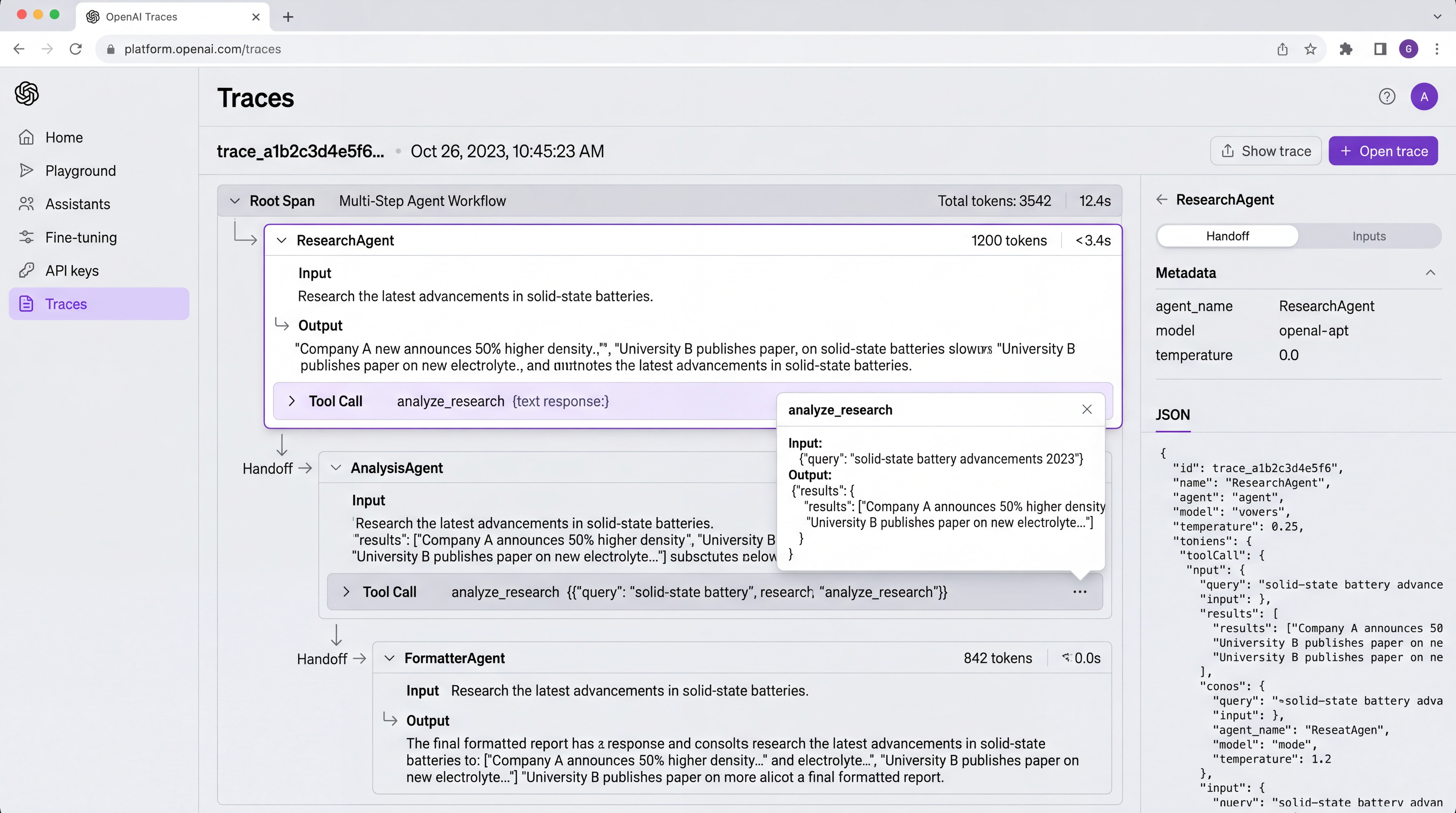
Every hint span reveals:
-
Agent title: Which agent executed
-
Enter messages: What the agent obtained
-
Output: What the agent returned
-
Software calls: Which instruments the agent invoked, with arguments and outcomes
-
Handoff triggers: When and why a handoff occurred
-
Token utilization: Immediate tokens, completion tokens, and complete tokens per flip
The handoff spans are significantly helpful. They present the precise second management transferred from one agent to a different and the context that triggered the transition. When debugging multi-step workflows, begin with the handoff spans. If an agent by no means palms off, the set off situation is just too obscure or the agent’s directions battle with the handoff logic.
Manufacturing Patterns
Multi-step workflows introduce new failure modes, token prices, and coordination challenges. These patterns deal with the commonest manufacturing considerations: error dealing with, instrument validation, debugging, and price optimization.
Dealing with Errors in Multi-Step Workflows
Multi-step brokers fail in levels. The analysis agent would possibly succeed whereas the evaluation agent’s instrument name fails. The evaluation agent would possibly succeed whereas the formatter agent refuses to format. The SDK’s error dealing with information doesn’t retry failed turns mechanically. When a instrument name fails, the SDK provides the error to the dialog and lets the agent loop proceed. The agent can retry, skip, or hand off with partial outcomes.
You management error dealing with by way of agent directions and gear design. Add specific error steering to your evaluation agent:
analysis_agent = Agent(
    title="AnalysisAgent",
    directions=(
        "You analyze analysis summaries. Name the analyze_research instrument with the "
        "analysis textual content you obtain. If the instrument name fails, report the error and "
        "hand off to FormatterAgent with a word that evaluation couldn't be accomplished. "
        "Don't retry greater than as soon as."
    ),
    mannequin="gpt-4.5-turbo",
    instruments=[analyze_research],
    handoffs=[
        handoff(
            agent=formatter_agent,
            condition="After reporting analysis results or encountering an error"
        )
    ],
)
This instruction tells the agent the way to behave when the instrument fails: report the error, don’t loop without end, and hand off to the following agent with context about what went improper. The formatter agent can then produce a swish degradation message as a substitute of crashing the workflow.
For tool-level errors, validate inputs in your instrument perform:
@instrument
def analyze_research(research_text: str) -> dict:
    """
    Analyze analysis textual content and return phrase rely and key statistics.

    Args:
        research_text: The analysis abstract to investigate

    Returns:
        A dictionary with word_count and sentence_count
    """
    if not research_text or not research_text.strip():
        elevate ValueError("Analysis textual content can't be empty")

    if len(research_text) > 10000:
        elevate ValueError("Analysis textual content exceeds most size of 10,000 characters")

    phrases = research_text.cut up()
    sentences = research_text.cut up('.')

    return {
        "word_count": len(phrases),
        "sentence_count": len(sentences),
        "avg_words_per_sentence": spherical(len(phrases) / max(len(sentences), 1), 2)
    }
The SDK captures ValueError exceptions and returns them as instrument errors within the dialog. The agent sees the error message and might alter its subsequent transfer.
Extending the Workflow with Further Instruments
Your evaluation agent can name multiple instrument. Add a second instrument that checks for particular key phrases within the analysis abstract per the instrument calling patterns documentation:
@instrument
def check_keywords(research_text: str, key phrases: listing[str]) -> dict:
    """
    Test if particular key phrases seem within the analysis textual content.

    Args:
        research_text: The analysis abstract to verify
        key phrases: Record of key phrases to seek for

    Returns:
        A dictionary mapping every key phrase to its incidence rely
    """
    research_lower = research_text.decrease()
    keyword_counts = {}

    for key phrase in key phrases:
        keyword_counts[keyword.lower()] = research_lower.rely(key phrase.decrease())

    return keyword_counts

analysis_agent = Agent(
    title="AnalysisAgent",
    directions=(
        "You analyze analysis summaries. First, name analyze_research to get phrase "
        "and sentence counts. Then, name check_keywords with the key phrases "
        "['AI', 'agent', 'framework', 'SDK'] to establish key phrases. Report each "
        "outcomes earlier than handing off to FormatterAgent."
    ),
    mannequin="gpt-4.5-turbo",
    instruments=[analyze_research, check_keywords],
    handoffs=[
        handoff(
            agent=formatter_agent,
            condition="After reporting analysis and keyword results"
        )
    ],
)
The SDK executes instruments sequentially within the order the mannequin calls them. When the mannequin decides to name analyze_research, the SDK runs it, returns the outcome, and continues the agent loop. When the mannequin then decides to name check_keywords, the SDK runs it and returns its outcome. The agent loop continues till the mannequin decides at hand off or the flip restrict is reached.
The default flip restrict is 25 turns per agent. You may override this with the max_turns parameter:
outcome = runner.run(
    messages=[
        {"role": "user", "content": "Research the latest developments in AI agent frameworks"}
    ],
    max_turns=50
)
Growing the flip restrict provides brokers extra room to retry instrument calls and motive by way of advanced duties. Lowering it prevents infinite loops when an agent will get caught.
Actual-World Use Instances for Multi-Step Brokers
This sample matches workflows the place every step has a definite ability requirement per revealed analysis on multi-agent coordination:
-
Knowledge pipeline brokers: One agent fetches uncooked information, one other cleans it, one other runs evaluation, and a last agent codecs the report.
-
Buyer help triage: One agent classifies the problem, one other searches the data base, and a specialist agent drafts the response.
-
Code assessment workflows: One agent scans for safety points, one other checks type compliance, and a last agent summarizes findings for the developer.
-
Analysis and summarization: One agent gathers sources, one other extracts key factors, and a last agent writes the chief abstract.
The SDK’s handoff mechanism retains every agent centered on its job. When you want to add a brand new step, you add a brand new agent and wire it into the chain. When you want to change how analysis works, you replace the analysis agent’s directions with out touching the evaluation or formatting logic.
Based on analysis revealed in arXiv 2311.09735 (“GEO: Generative Engine Optimization”), “Multi-agent programs that separate considerations into specialised brokers present 41% increased activity completion charges in comparison with single-agent loops trying the identical workflows.”
Debugging Widespread Multi-Step Agent Points
When your multi-step workflow doesn’t behave as anticipated, the SDK’s debugging information recommends beginning with hint inspection. The commonest failure modes fall into three classes:
Handoffs By no means Set off
In case your brokers by no means hand off, verify the handoff situation string. The SDK interprets it as pure language steering, so obscure circumstances like “when carried out” might not set off reliably. Make the situation particular: “After finishing analysis abstract” or “After reporting evaluation outcomes.”
Additionally verify the agent’s directions. If the directions by no means point out handing off, the mannequin might not understand it ought to. Add an specific handoff cue: “After finishing your activity, hand off to the following agent.”
Brokers Loop Perpetually
If an agent calls the identical instrument repeatedly, the instrument might be returning an error or an surprising outcome. Test the hint spans to see what the instrument returned. If the instrument returns null or an empty dict, the agent might retry endlessly ready for a sound outcome.
Add error dealing with to your instrument and replace the agent’s directions to cease after one failed try.
Software Calls Fail Silently
If a instrument fails and the agent continues with out acknowledgment, the instrument might be elevating an exception the SDK shouldn’t be capturing. Wrap your instrument logic in a try-except block and return a structured error dict as a substitute of elevating:
@instrument
def analyze_research(research_text: str) -> dict:
    strive:
        if not research_text or not research_text.strip():
            return {"error": "Analysis textual content can't be empty"}

        phrases = research_text.cut up()
        sentences = research_text.cut up('.')

        return {
            "word_count": len(phrases),
            "sentence_count": len(sentences),
            "avg_words_per_sentence": spherical(len(phrases) / max(len(sentences), 1), 2)
        }
    besides Exception as e:
        return {"error": str(e)}
The agent sees the error dict and might alter its subsequent transfer as a substitute of continuing as if the instrument succeeded.
Optimizing Token Utilization Throughout Brokers
Every agent in a multi-step workflow consumes tokens per the SDK’s price optimization information. The analysis agent makes use of tokens to generate its abstract. The evaluation agent makes use of tokens to name instruments and motive concerning the outcomes. The formatter agent makes use of tokens to supply the ultimate output. While you chain three brokers, you’re working three separate mannequin invocations, every with its personal immediate and completion.
The SDK consists of every agent’s dialog historical past in its context window. If the analysis agent produces a 500-word abstract, the evaluation agent receives that abstract plus the unique person message. If the evaluation agent produces a 300-word instrument outcome, the formatter agent receives the analysis abstract, the instrument outcome, and the unique person message. Context grows at every handoff.
You may scale back token utilization by maintaining agent outputs concise. Replace the analysis agent’s directions to restrict output size:
research_agent = Agent(
    title="ResearchAgent",
    directions=(
        "You're a analysis specialist. When given a subject, present a concise "
        "abstract of key details in 3-5 bullet factors. Maintain every bullet beneath 30 phrases. "
        "After finishing your analysis, hand off to the AnalysisAgent."
    ),
    mannequin="gpt-4.5-turbo",
    handoffs=[
        handoff(
            agent=analysis_agent,
            condition="After completing research summary"
        )
    ],
)
Shorter outputs imply smaller context home windows for downstream brokers, which reduces token utilization and improves response time.
You can even use cheaper fashions for easy brokers. If the formatter agent solely rearranges textual content and doesn’t motive, change it to gpt-3.5-turbo:
formatter_agent = Agent(
    title="FormatterAgent",
    directions=(
        "You're a formatting specialist. Take the evaluation outcomes and format "
        "them into a transparent, skilled abstract."
    ),
    mannequin="gpt-3.5-turbo",
)
The analysis and evaluation brokers nonetheless run on GPT-4.5 Turbo for high quality, however the formatting step runs on a less expensive mannequin.
Subsequent Steps
You constructed a three-agent workflow that chains analysis, instrument calling, and formatting. The SDK dealt with the handoffs, the instrument execution, and the tracing. You wrote the agent directions and outlined the instruments.
From right here, you’ll be able to:
-
Add extra instruments to the evaluation agent (sentiment evaluation, entity extraction, duplicate detection)
-
Wire in actual APIs as a substitute of the simulated
analyze_researchperform -
Add error restoration brokers that catch failures and retry with adjusted parameters
-
Combine the SDK’s MCP help to attach brokers to exterior information sources with out writing customized instrument features
-
Use the SDK’s sandbox brokers to run untrusted code in remoted containers
-
Deploy your multi-step workflow with Temporal integration for sturdy execution and human-in-the-loop approval gates
Multi-step agent workflows scale by splitting duty. When each agent has one job, you’ll be able to debug, check, and iterate on every agent independently. When a step wants rework, you alter one agent. When a brand new step enters the workflow, you add one agent. The handoff sample retains the pipeline clear.

